
Showing posts with label Top 10. Show all posts
The Best Nokia Phones of All Time
“With the Launch of Nokia 6 in Chinese Market Nokia is back with a Bang with Registrations of 25 lakh Mobiles within 60 secs.We take a look at some of the most iconic Nokia mobile phones ever”
Nokia reigned as the king of the phone industry for a long period of time, before it eventually withered away and moved into the annals of cellphone history. While waiting for the next chapter in the Nokia’s book to unfold, we decided to travel back in time and take a look at some of the most iconic phones from the brand which we wouldn’t mind buying even today. So, grab some tissues as a wave of nostalgia is about to hit you.
Nokia 8110

Remember the scene in the first Matrix movie where Neo was escaping from agents in his office whilst talking to a mysterious man on a mobile phone? Well, the person Neo was talking to was Cypher and the phone he used was the Nokia 8110, which made news back in the day owing to its unique slider design which could be used to answer or end calls.
Nokia 3310
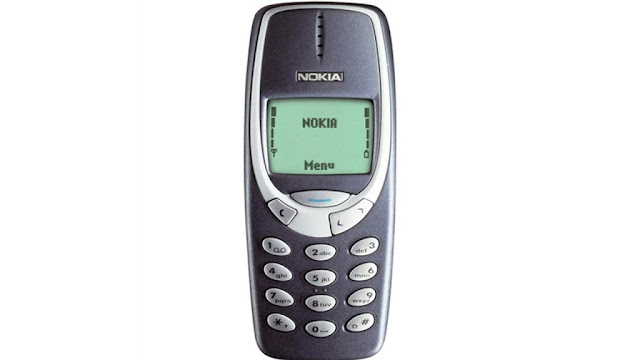
Not a lot of people had a mobile phone back in 2000, but if you did, chances are it was the Nokia 3310. Perhaps the most popular Nokia device, the 3310 still holds the benchmark for a smartphone’s durability and is extensively used in a host of internet memes even today. Regardless of how good mobile games might be today, they still fall short of the hours of fun Snake II had to offer.
Nokia 6600

The 6600 was a quirkily designed Nokia mobile phone which garnered huge success. Be it the ginormous VGA camera on the back or the support for Bluetooth and infrared, the 6600 had it all back in the day. Not to mention, the device came with a joystick instead of a D-pad which was compatible with certain games as well.
Nokia Communicator E90

Nokia revamped its iconic communicator series with the E90 which sported a laptop-like profile and dual-displays. The idea was that the smartphone could be used as a normal mobile phone with the flap closed and could offer extra room to enhance productivity with the larger 4-inch display that was housed within.
Nokia N95
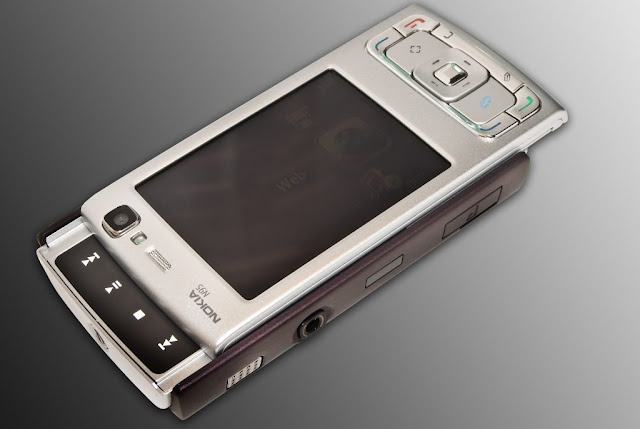
Nokia’s answer to Apple’s iPhone came in the form of N95, the most powerful smartphone for the year 2007. The device came with features like GPS along with a 5MP camera which was way ahead of its time. Toting a dual-slider form factor and support for 3.5G, the N95 was the biggest threat to Apple’s iPhone and a ‘flagship killer’ before the term was cool.
Nokia N900

The first and the only phone to run Linux-based Maemo OS, the Nokia N900 combined the productivity of the communicator series with the media-centric approach taken by the N series.
Nokia Pureview 808
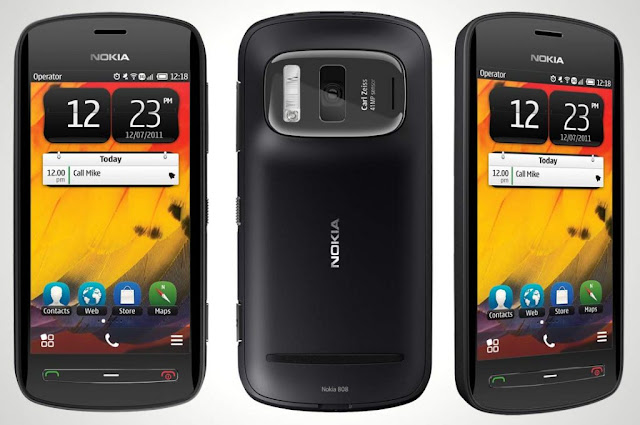
The USP of Nokia’s Pureview 808 was the massive 41MP camera sensor at the back, which to this date, is the biggest sensor to be housed within a smartphone. Aided with Pureview technology and Carl Zeiss optics, the device was capable of shooting some incredible stills. However, booting Symbian OS in 2012 made the 808 outdated before one could even open the box it shipped in.
Nokia X7

One of the frontrunners of Nokia’s Symbian^3 OS which was later renamed to Anna and then to Belle, the X7 brought some refreshing changes to the software side of things with support for portrait keyboard and improved browser experience.
Nokia E71

The iconic E series from Nokia was aimed to give business professionals something other than a Blackberry to gawk about. Jacketed in a metallic body, the E71 quickly became a fan favourite owing to its optimised email and messaging support. While not as media-centric as the N95 or the N97, the E71 still came with support for Wi-Fi, 3G and A-GPS.
Nokia 5800
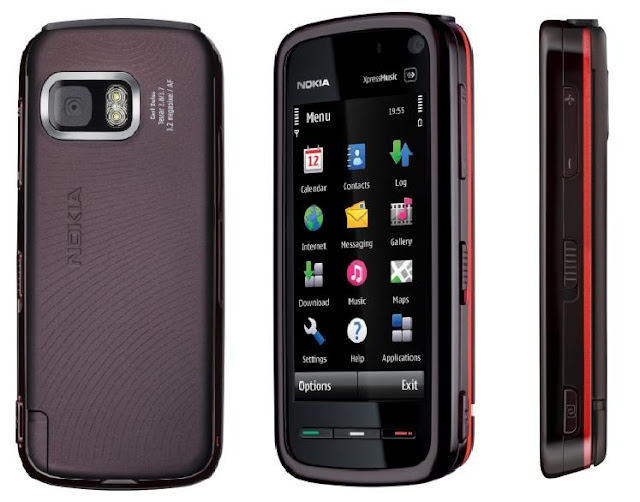
The phone which made a debut on the big screen with Christopher Nolan’s Dark Knight was the first all-touch smartphone from Nokia which came with an optimised version of the Symbian OS. The mobile phone was a huge hit in the Indian market and shipped with a 3.2MP autofocus camera with a Carl-Zeiss lens.
Nokia reigned as the king of the phone industry for a long period of time, before it eventually withered away and moved into the annals of cellphone history. While waiting for the next chapter in the Nokia’s book to unfold, we decided to travel back in time and take a look at some of the most iconic phones from the brand which we wouldn’t mind buying even today. So, grab some tissues as a wave of nostalgia is about to hit you.
Nokia 8110
Remember the scene in the first Matrix movie where Neo was escaping from agents in his office whilst talking to a mysterious man on a mobile phone? Well, the person Neo was talking to was Cypher and the phone he used was the Nokia 8110, which made news back in the day owing to its unique slider design which could be used to answer or end calls.
Nokia 3310
Not a lot of people had a mobile phone back in 2000, but if you did, chances are it was the Nokia 3310. Perhaps the most popular Nokia device, the 3310 still holds the benchmark for a smartphone’s durability and is extensively used in a host of internet memes even today. Regardless of how good mobile games might be today, they still fall short of the hours of fun Snake II had to offer.
Nokia 6600
The 6600 was a quirkily designed Nokia mobile phone which garnered huge success. Be it the ginormous VGA camera on the back or the support for Bluetooth and infrared, the 6600 had it all back in the day. Not to mention, the device came with a joystick instead of a D-pad which was compatible with certain games as well.
Nokia Communicator E90
Nokia revamped its iconic communicator series with the E90 which sported a laptop-like profile and dual-displays. The idea was that the smartphone could be used as a normal mobile phone with the flap closed and could offer extra room to enhance productivity with the larger 4-inch display that was housed within.
Nokia N95
Nokia’s answer to Apple’s iPhone came in the form of N95, the most powerful smartphone for the year 2007. The device came with features like GPS along with a 5MP camera which was way ahead of its time. Toting a dual-slider form factor and support for 3.5G, the N95 was the biggest threat to Apple’s iPhone and a ‘flagship killer’ before the term was cool.
Nokia N900
The first and the only phone to run Linux-based Maemo OS, the Nokia N900 combined the productivity of the communicator series with the media-centric approach taken by the N series.
Nokia Pureview 808
The USP of Nokia’s Pureview 808 was the massive 41MP camera sensor at the back, which to this date, is the biggest sensor to be housed within a smartphone. Aided with Pureview technology and Carl Zeiss optics, the device was capable of shooting some incredible stills. However, booting Symbian OS in 2012 made the 808 outdated before one could even open the box it shipped in.
Nokia X7
One of the frontrunners of Nokia’s Symbian^3 OS which was later renamed to Anna and then to Belle, the X7 brought some refreshing changes to the software side of things with support for portrait keyboard and improved browser experience.
Nokia E71
The iconic E series from Nokia was aimed to give business professionals something other than a Blackberry to gawk about. Jacketed in a metallic body, the E71 quickly became a fan favourite owing to its optimised email and messaging support. While not as media-centric as the N95 or the N97, the E71 still came with support for Wi-Fi, 3G and A-GPS.
Nokia 5800
The phone which made a debut on the big screen with Christopher Nolan’s Dark Knight was the first all-touch smartphone from Nokia which came with an optimised version of the Symbian OS. The mobile phone was a huge hit in the Indian market and shipped with a 3.2MP autofocus camera with a Carl-Zeiss lens.
Top 5 Must Have Games for IOS-August 2015
Hey Guys Wapwing have brought a list of new released games that you must download on your IOS Devices this August 2015.
The Devices we use are becoming more and more powerful day by day. But Honestly do we use all the Power that our Smartphone or Tablet Have..? Probably not.Although we have Ten's of Thousands of Apps & Games Available for downloading.There's always confusion that which game or app we should download on our device.So No worry friend's iam Here to Solve the confusion.Following is the list of top 5 Games that IOS users must download this August.
1. Jurassic World- The Game.

Price-Free
If you love games that are based on film's then you must have Jurassic world on your Iphone or Ipad.The Game is Solely based on the 2015 Blockbuster Film Jurrasic World and its character's.

In the Game you play as the Manager of Jurrasic World, which includes Maintainence of the Dinosaurs,Evolving & Breeding.The Story of the Game is Based on the film hence all the Dinosaurs in the film are available in the game also.And the best part of the game is that you can download it free from the Appstore.
2. Downhill Riders.

Price-Free
The Next must download is an addictive game named Downhill Riders.In this game you just have to ride all the way down from a never ending hill.The Hill has a two lane road in which you can swipe left or right to avoid obstacles.The controls are pretty easy and there are tons of unlockable item which'll remind you of Subway Surfers.This game is targeted to all ages. so beaware you can get addicted to it.
3. Warhammer 40,000-Carnage.

Price-RS. 300
The Next game is for Strategy lovers. Which is the IOS version of famous game War Hammer already available for Android users.The Controls are pretty tough but the graphics are really awesome.If you are bored with the repeatative story line games out there,then this game is for you.

In this game you have to play a hard challenge to complete each mission and move to the next one which sometimes could be real tough.The game will also remind you of Chess.But wait yo u have to pay 300 rs. to play this game.so be ready for War Hammer.
4. Age of Empires-Castle Siege.

Price- Free
You must have heard the name of Age of Empires,the good'ol strategy game which many of us have played on our PC.Now the new version of the game has come to the App Store,which is a must download for Ipad users.

The controls are same as the old versions of the game but the Graphics are pretty much different.The Story is based on Civilization and Empires in which you have to build your Empire and try to Crush others to be the only civilization to survive.This Game is free on the IOS App Store.
5. Ice Age Adventures.

Price-Free
Ice Age Adventures is an Fun Game to Play on your Smartphones.The Game includes all the characters from the Film.It's a combination of stratergy games and games like Temple Run or Subway Surfers.You Should Give it a try as it's available free on itunes.
Keep Playing and Keep Visiting for more such posts & don't forget to post Comments.
The Devices we use are becoming more and more powerful day by day. But Honestly do we use all the Power that our Smartphone or Tablet Have..? Probably not.Although we have Ten's of Thousands of Apps & Games Available for downloading.There's always confusion that which game or app we should download on our device.So No worry friend's iam Here to Solve the confusion.Following is the list of top 5 Games that IOS users must download this August.
1. Jurassic World- The Game.
If you love games that are based on film's then you must have Jurassic world on your Iphone or Ipad.The Game is Solely based on the 2015 Blockbuster Film Jurrasic World and its character's.
In the Game you play as the Manager of Jurrasic World, which includes Maintainence of the Dinosaurs,Evolving & Breeding.The Story of the Game is Based on the film hence all the Dinosaurs in the film are available in the game also.And the best part of the game is that you can download it free from the Appstore.
2. Downhill Riders.
Price-Free
The Next must download is an addictive game named Downhill Riders.In this game you just have to ride all the way down from a never ending hill.The Hill has a two lane road in which you can swipe left or right to avoid obstacles.The controls are pretty easy and there are tons of unlockable item which'll remind you of Subway Surfers.This game is targeted to all ages. so beaware you can get addicted to it.
3. Warhammer 40,000-Carnage.
Price-RS. 300
The Next game is for Strategy lovers. Which is the IOS version of famous game War Hammer already available for Android users.The Controls are pretty tough but the graphics are really awesome.If you are bored with the repeatative story line games out there,then this game is for you.
In this game you have to play a hard challenge to complete each mission and move to the next one which sometimes could be real tough.The game will also remind you of Chess.But wait yo u have to pay 300 rs. to play this game.so be ready for War Hammer.
4. Age of Empires-Castle Siege.
Price- Free
You must have heard the name of Age of Empires,the good'ol strategy game which many of us have played on our PC.Now the new version of the game has come to the App Store,which is a must download for Ipad users.
The controls are same as the old versions of the game but the Graphics are pretty much different.The Story is based on Civilization and Empires in which you have to build your Empire and try to Crush others to be the only civilization to survive.This Game is free on the IOS App Store.
5. Ice Age Adventures.
Price-Free
Ice Age Adventures is an Fun Game to Play on your Smartphones.The Game includes all the characters from the Film.It's a combination of stratergy games and games like Temple Run or Subway Surfers.You Should Give it a try as it's available free on itunes.
Keep Playing and Keep Visiting for more such posts & don't forget to post Comments.
Top 5 Android Games to Test Your Smartphone Processor 2015
5. Asphalt 8: Airborne
Developer: Gameloft

4. Batman: Arkham City Lockdown
Devloper:NetherRealm Studios

3. Fifa 15 UT
Developer: EA Sports

2. Modern Combat 5: Blackout
Developer: Gameloft

1. WWE Immortals
Developer: NetherRealm Studios


Check Out Full Review Of WWE Immortals Here
Developer: Gameloft
4. Batman: Arkham City Lockdown
Devloper:NetherRealm Studios
3. Fifa 15 UT
Developer: EA Sports
2. Modern Combat 5: Blackout
Developer: Gameloft
1. WWE Immortals
Developer: NetherRealm Studios
Check Out Full Review Of WWE Immortals Here
Top 3 Best Apps For Survivalists
If you really want to escape the 9-5 this summer, go feral
with the help of the best survivalism and exploration apps

Just because you love gadgets and tech it doesn't mean you
need to spend all summer sat in front of a glowing screen with your
headphones on.
Heading off into the wilderness to reconnect with Mother Nature can be a great way to recharge your batteries and prepare you for the inevitable depression that the long winter months will bring.
But while Ray Mears may be able to fashion an impregnable fortress out of a single twig and prepare a six-course banquet out of a grasshopper, the modern geek has a different weapon at their disposal: the smartphone.
Yes, these days you can indulge your survivalist fantasies while getting a helping hand from an app. These are the six we'd take with us into the wild.
1. Smart Compass
Heading off into the wilderness to reconnect with Mother Nature can be a great way to recharge your batteries and prepare you for the inevitable depression that the long winter months will bring.
But while Ray Mears may be able to fashion an impregnable fortress out of a single twig and prepare a six-course banquet out of a grasshopper, the modern geek has a different weapon at their disposal: the smartphone.
Yes, these days you can indulge your survivalist fantasies while getting a helping hand from an app. These are the six we'd take with us into the wild.
1. Smart Compass

Wapwing Says: ✭✭✭✭✩
Platform: Android Price: £free
2. SAS Survival Guide

Wapwing Says: ✭✭✭✭✭
Platform: Android, iOS, Windows Phone Price: from £2.59
Download SAS Survival Guide for Android here
Download SAS Survival Guide for iOS here
Download SAS Survival Guide for Windows Phone here
3. Magnificent Magnifier HD

This might not seem like an essential tool for a survivalist, but there are plenty of occasions when the ability to zoom in on some tiny detail will come in handy. There are loads of magnifying-glass apps out there, but we’d stick our pin in this one. It’s great for diagnosing vehicle breakdowns or making repairs in dark spaces, as well as improving legibility of maps or small print. And unlike with a normal magnifying glass, you won't need to juggle a torch at the same time when using it in the dark.
Wapwing Says: ✭✭✭✭✩
Platform: Android Price: £free
Top 11 Whatsapp Secrets You Don't Know
We've rounded up some top tips for everyone's favourite
instant messaging service. Time to cure the blue tick curse...

What a furor WhatsApp caused with a colour change in its double ticks.
Its latest update confirmed what we’ve always suspected
(but never bothered confirming) all along - namely that the ticks
represent when your messages are delivered, and confirm that they've
been read.
On the flipside, this incident also inspired us to dig
deeper, and we've gatherd up a bunch of features hiding in the nooks and
crannies of WhatsApp.
Prepare to level up your IM attributes:
1. Begone, Blue Ticks of Misery

We know how it is. You're at figure skating practice, your phone buzzes, and you glance down briefly before nailing a spectacular triple axle.
Sometimes you've only got time for a quick glance, taking a little time to formulate a response as you carry on with the rest of our day. Ideally without having the sender realise that we actually looked at said message five hours ago, as otherwise they'd think we're ignoring them. That's the privelege the blue ticks take away.
Recently though, the chat app has realised the error of its ways and silently come up with a workaround. The liberty of message-mulling is ours again.
How: Users can just access Privacy via Settings and disable Read Receipts. However, this feature is currently only available to Android users who are on the all new beta version of the app.
If you're that desperate though, you have to download the beta and head to your Android phone's settings, enable Unknown Sources to install the APK file as it's not in the Google Play Store yet.
There, now it's time to iron out the kinks in your friendships that the blue ticks have caused. The rest of us will just have to wait for a future update.
2. See When your Messages are Read

In addition to finding out the exact time your messages are delivered, you can also choose to see the exact time your message was read if you choose to stick with the ticks.
How: Go to any of your WhatsApp chats,
tap and hold on any of the messages you’ve sent in that chat, followed
by the Info option. For iOS users, you can also drag towards the left to
reveal a window which will show the time your message was delivered and
subsequently read.
It works for group messages too with the window listing the time each participant read the message.
3. Tied To your Number

How: When you put your new SIM in and
activate WhatsApp, you’ll be prompted by the messaging service to
register the new number. But doing so will mess up your contacts list.
Just ignore the pop-up or cancel it, and your WhatsApp should work
linked to your old number, while using your new data SIM.
4. Sending Public Messages Privately

If you’ve got a generic announcement to make - an invite to a weekend BBQ or an intervention about your friend's unhealthy obsession with KFC - and you don’t want to do it on the loudmouth platform that is Facebook, this feature works in pretty much the same way as BCC-ing people in an email.
How: On the top left hand corner of your WhatsApp Chats window, just below the search bar, you’ll notice a Broadcast Lists. Tap on it for the option to create a new list of contacts you want your message to go out to, and message away like you would normally.
5. Back It Up

Worried about losing a year’s worth of messages? You don’t have to.WhatsApp knows how precious your chat history is to you and secures it all for you in the cloud.
How: iPhone users get the option of
backing their chat history to iCloud automatically on a
daily/weekly/monthly schedule. If it’s only selected chat histories you
desire, click on the chat you want, then the user’s name and finally
email conversation to yourself.
Android users will find the file within the WhatsApp
folder in their phone. Make sure that file, found in WhatsApp >
Databases and named msgstore.db.crypt7, is copied and transferred to the
exact same folder if you wipe your phone or get a new Android device.
6. Shortcuts to Conversations

How: Tap and hold on the chat (group or individual) of your choice and a tab will pop up. Select the Add Conversation Shortcut option and the chat in question will appear as the person's profile photo on your mobile desktop. Unfortunately this only applies for Android users and not iPhone ones. Sorry guys.
7. Saving Media

When you’re on a 1GB data plan, every MB counts. You don’t want to be slapped with a hefty bill at the end of the month from sending stupid shareable memes and screenshots of every little thing. There’s a way to make sure that all that heavy-duty image sending won’t eat up what little complimentary data you might have in your plan.
How: Go to Settings, then Chat Settings
and then Auto-Download and tweak the settings for how you want your
received media to be downloaded. Choose Wi-Fi if you don’t want to
overload your data plan. Alternatively, you can trigger downloads
manually by switching Auto-Download to Never. You can also save the
hassle of having to clean up your camera roll every so often by tweaking
Save Incoming Media off.
8. Keeping Group Chats on the Down Low

How: Head to Settings, Privacy, and then tweak your Last Seen, Profile Photo and Status to retain a bit of mystery. Choose to share them with Everyone, or only your Contacts, or Nobody at all. Unfortunately, there’s nothing you can do about hiding your phone number.
9. Mute Group Chats

We’re all in at least a few group chats at any one time, created because someone (likely the group admin) was bored. People tend to get overzealous in chats, especially since WhatsApp allows group conversations of up to 50 participants. Who hasn’t woken up to the horror of 100+ unread messages fuelled by a night of boredom?
How: To prevent yourself from being woken up by the constant lighting up of your smartphone screen, you can (a) either flip yourphone over and ignore it or (b) Mute the offending group chat. Tap on the group chat of your choice, then the name to bring up Group Info where you will find the option to Mute the chat for eight hours to one week or a year. Alternatively, you can exit it altogether.
10. Staying Selectively Notified

Not all group chats are created equal, as some are filled with nothing but white noise. And it’s exactly those group chats you want to ignore until you get some down time to sieve through everything that’s been said. On the flipside, there are the group chats you want to stay on top of like ones deciding dinner plans for the night and so on. Here’s how you can stay selectively notified.
How: Go to the significant group chats,
tap on the name to bring up Group Info and then Custom Notifications.
There, you can select a custom message alert for the group chats of your
choice. All you have to do now is remember which alert tone you
assigned to which group chat. This customisation is only applicable for
group chats though.
11. Find Out the Truth About Where Your Friend Is

We've all been a victim of that “on the way” lie when the person in question is still in bed. To prevent yourself from ever getting duped again, insist that the contact shares their current location with you by tapping on the arrow icon next to the text box and then Share Location. There's also a way of preventing them from manually entering their l
How: The way the location appears is a
clue. If it’s a real GPS-based location, the location share will appear
as a dropped pin, but if it’s a location they entered, its address will
appear beside the dropped pin. Feel free to call them out on it.
Top 10 Mobiles In India Under Rs.10,000/-
1. Asus Zenfone 5

The Asus Zenfone 5 is clearly the best smartphone to buy under Rs. 10,000 in India today. You get top class performance, good camera with flash and autofocus, elegant looks and well-built. And, it is also good in the battery life department. You couldn't ask for more for a phone that costs less than Rs. 10,000!
2. Motorola Moto E

If You Want to go for a renowned brand go for Moto E. It has an excellent screen, runs on latest Android OS (KitKat) and offers fluid performance for all general tasks. The only reason to choose the second best phone, the Nokia Lumia 525 over the Moto E is if you want a better camera (yes, Moto E has average camera performance, especially in low-light).
3. Xiaomi Redmi 1S

The Xiaomi Redmi 1S is a true value for money smartphone. It offers excellent specifications at a very low price point. If only the UI wasn't so heavy, we would have recommend the Redmi 1S over the Moto E.
4. Asus Zenfone 4

The smaller sibling of the Zenfone 5, the Asus Zenfone 4 has the same processor and thus gives the same class leading core performance. The Zenfone 4 offers a good camera, comes with very good build quality for it's price and the 4-inch screen makes it a compact and easy to use smartphone.
5. Nokia Lumia 525

The Lumia 525 is not only one of the least expensive Windows Phone handsets out there, but it is also one that offers a tremendous amount of value for its price.
6. Micromax Canvas Elanza 2 A121

This new Micromax smartphone is their best Android phone under Rs. 10,000. It sports a 5-inch 720p screen and runs on a Qualcomm snapdragon 200 quad-core processor coupled with 1GB of RAM. You get 8MP rear camera and 2MP front camera for capturing images and videos. With 2000 mAh battery, the phone should also do a fairly good job in the battery life department.
7. Nokia Lumia 630

Nokia Lumia 630 offers latest Windows Phone 8.1 OS. It is a very well designed and built phone in the sub 10K range. The phone is pretty fast, has Gorilla Glass 3 protection along with Nokia Clear Black display technology.
8. Sony Xperia E1 Dual

Sony Xperia E1 dual is a compact smartphone running on dual-core Snapdragon 200 SoC. We recommend the E1 dual to anyone looking for a well-built Android smartphone with compact dimensions and good music playback quality.
9. Micromax Canvas 2 Colors A120

Good smartphone option for those who seek choice in terms of colors and also want the option of interchangeable back shells. With a 5-inch HD screen and a quad-core processor combined with 1GB RAM, this Android Jelly Bean based phone is fast enough for most daily tasks.
10. Karbonn Titanium S1 Plus

This is the cheapest of all the smartphones in our list of best phones for Rs. 10,000 in India. While being very affordable, the Karbonn Titanium S1 Plus manages to offer a Qualcomm quad-core processor along with 1GB RAM. Making it one of the fastest in its price range.
`
The Asus Zenfone 5 is clearly the best smartphone to buy under Rs. 10,000 in India today. You get top class performance, good camera with flash and autofocus, elegant looks and well-built. And, it is also good in the battery life department. You couldn't ask for more for a phone that costs less than Rs. 10,000!
2. Motorola Moto E
If You Want to go for a renowned brand go for Moto E. It has an excellent screen, runs on latest Android OS (KitKat) and offers fluid performance for all general tasks. The only reason to choose the second best phone, the Nokia Lumia 525 over the Moto E is if you want a better camera (yes, Moto E has average camera performance, especially in low-light).
3. Xiaomi Redmi 1S
The Xiaomi Redmi 1S is a true value for money smartphone. It offers excellent specifications at a very low price point. If only the UI wasn't so heavy, we would have recommend the Redmi 1S over the Moto E.
4. Asus Zenfone 4
The smaller sibling of the Zenfone 5, the Asus Zenfone 4 has the same processor and thus gives the same class leading core performance. The Zenfone 4 offers a good camera, comes with very good build quality for it's price and the 4-inch screen makes it a compact and easy to use smartphone.
5. Nokia Lumia 525
The Lumia 525 is not only one of the least expensive Windows Phone handsets out there, but it is also one that offers a tremendous amount of value for its price.
6. Micromax Canvas Elanza 2 A121
This new Micromax smartphone is their best Android phone under Rs. 10,000. It sports a 5-inch 720p screen and runs on a Qualcomm snapdragon 200 quad-core processor coupled with 1GB of RAM. You get 8MP rear camera and 2MP front camera for capturing images and videos. With 2000 mAh battery, the phone should also do a fairly good job in the battery life department.
7. Nokia Lumia 630
Nokia Lumia 630 offers latest Windows Phone 8.1 OS. It is a very well designed and built phone in the sub 10K range. The phone is pretty fast, has Gorilla Glass 3 protection along with Nokia Clear Black display technology.
8. Sony Xperia E1 Dual
Sony Xperia E1 dual is a compact smartphone running on dual-core Snapdragon 200 SoC. We recommend the E1 dual to anyone looking for a well-built Android smartphone with compact dimensions and good music playback quality.
9. Micromax Canvas 2 Colors A120
Good smartphone option for those who seek choice in terms of colors and also want the option of interchangeable back shells. With a 5-inch HD screen and a quad-core processor combined with 1GB RAM, this Android Jelly Bean based phone is fast enough for most daily tasks.
10. Karbonn Titanium S1 Plus
This is the cheapest of all the smartphones in our list of best phones for Rs. 10,000 in India. While being very affordable, the Karbonn Titanium S1 Plus manages to offer a Qualcomm quad-core processor along with 1GB RAM. Making it one of the fastest in its price range.