wapwing.blogspot.in. Powered by Blogger.

Showing posts with label Windows Phone. Show all posts

Ringo:Now all STD & Local Calls @ 0.19 Rs.

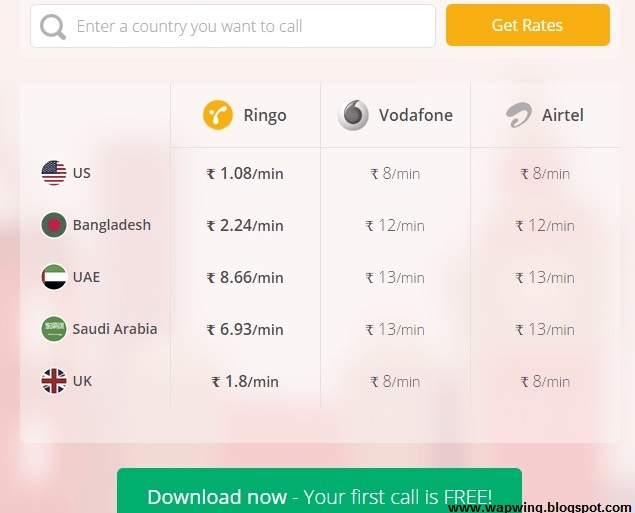
Ringo, a popular voice calling app that arrived in India earlier this year, on Thursday announced that it is introducing new tariff charges for voice calls in the country. The company says that using its services, people will be able to make calls across the country - local as well as STD -- at Rs. 0.19 per minute.

http://i.ringo.co/1rJ0NcFQ

The app, which debuted its service last year in over a dozen regions, offers voice calls at Rs. 0.19 per minute. In comparison, popular telecom operators such as Airtel, Vodafone, Idea charge roughly around Rs. 1.20 per minute for STD calls, and Rs. 0.40 per minute with any special tariff plan. Ringo claims that users can reduce their talk time cost by up to 90 percent using its service.

So how does Ringo work?

http://i.ringo.co/1rJ0NcFQ

A user first needs to download Ringo app, and tap on the person he or she wishes to call. Instead of the user talking to that person directly, as the company mentions on its website, Ringo calls that person and connects the user to that contact. For this reason, recipients don't need to have the app installed on their handset, and voice calls work without a reliable data connection.

Bhavin Turakhia, CEO and Founder of Ringo said:
"Our vision has been to make calling across the globe simple, seamless and low-cost for the masses. Our local calling service is not only the cheapest in India right now, but it is also free of typical telecom-related hassles such as STD charges and differential pricing,"."In a country where 3G penetration is not fairly high throughout, we also have a strong edge over Internet telephony apps, as Ringo calls do not use data, and are comparable in price."

http://i.ringo.co/1rJ0NcFQ

We tested the app earlier this year and found it as good as advertised, though it is not 'completely Internet-free'. Ringo worked reliably and didn't have an issue even on spotty data networks. You can download the app for your Android phone from the Google Play Store, for your iPhone from the App Store, and for your Windows Phone handset from the Windows Phone Store.

Download Ringo App Now And Get 50 Local/STD Minutes Free Click to Download Now

Nokia Lumia 930 review

Microsoft and Nokia have delivered the best Windows Phone yet.


If you think the new Nokia Lumia 930 looks somewhat familiar, don’t worry.
Way back in March we reviewed a smartphone that’s almost exactly the same: the Nokia Lumia Icon. The Lumia Icon, exclusive to the Verizon network in the US, shares most of its DNA with the Lumia 930, but there are a number of key differences – and we felt that warranted giving the latter its own full review.

READ MORE: Nokia Lumia Icon review

Orange is the new back


The Lumia 930 couldn’t be described as skinny or small. It’s almost a centimetre thick and the 5in screen, even with a fairly narrow bezel, makes it a long, wide handset. But, despite the use of Gorilla Glass 3 and the metal-edged build, it’s not a heavy phone – and we found it sat quite comfortably in a trouser pocket.


The build quality befits the phone’s high-end status. Nokia has always enjoyed a reputation for solidly made gear and that’s certainly the case here: there’s nothing wobbly or creaky in evidence. Nor does the matte plastic back look or feel cheap – it’s a level or two above the plastic you’d find on the back of certain Korean-designed smartphones. The curved edges of the glass front panel also make for a lovely premium touch.
There are three hardware controls on the right-hand metal edge (the nano SIM tray and 3.5mm headphone socket are located on the top edge): a power button; a volume rocker; and a dedicated camera shutter button (more on that below). There’s a microUSB port on the bottom edge but, thanks to the wireless charging plate included in the Lumia 930’s box, you’ll rarely need to make use of that.
The Day-Glo orange finish of our review sample is certainly… eye-catching, and some might feel happier with one of the two more sober colour options: white or black. Oh, and orange isn’t the only wacky colour available: there’s fluorescent green too, if you're feeling particularly brave.

Dream screen


The 5in, 1920 x 1080 OLED screen is one of the Lumia 930’s best features, just as it was on the Lumia Icon. A 1080p resolution may not match the sheer pixel count of a 2K display such as that of the LG G3, but it’s still extremely sharp: the pixel density of 441ppi is still above that offered by leading phones such as the Apple iPhone 5s (326ppi), Samsung Galaxy S5 (432ppi) or Sony Xperia Z2 (424ppi).
It’s not just showing detail at which the Lumia 930’s screen excels: it’s also rich and vibrant when it comes to colour and contrast, bright enough to view outdoors on sunny days (albeit fairly shiny and reflective) and its wide viewing angles mean it stays vivid even when you’re viewing off-centre.
It’s a great all-purpose screen, although its 16:9 ratio makes it particularly suited to displaying video. The one slight issue we found is the presence of some smearing when scrolling through web pages and the like – but it’s hardly a deal-breaker.

What a performance


With a quad-core Snapdragon 800 and 2GB of RAM, the Lumia 930 is a powerful phone, and its AnTuTu Benchmark score reflects that. It racked up a total of 25,051, which puts it the same ballpark as phones such as the LG G2, Samsung Galaxy S4 and Sony Xperia Z1 and a little behind current top-tier models such as the LG G3, Samsung Galaxy S5 and Sony Xperia Z2. That said, it seemed totally at ease with whatever apps and games we chucked at it, and it’s the beefiest Windows Phone currently on sale (bar the equally-specced Lumia 1520, which is more of a phablet thanks to its 6in screen).

Nokia has been making Lumia phones compatible with wireless charging for a while now, but customers have been required to pay extra for a charging plate. That’s no longer the case, and the 930 comes with one in the box. A nice touch, and one that’ll ensure buyers make the most of the phone’s fuss-free charging capabilities.
The 2420mAh battery feels just about adequate for purpose. If you're watching a lot of video, surfing the web often or taking loads of photos, you'll find it may not last an entire day – but less intensive use should see it stretch into a second one.

READ MORE: Nokia Lumia 1520 review


Yes we cam

The 20MP sensor on the rear PureView camera is able to take either 19MP 4:3 ratio photos or 16MP 16:9 photos, and automatically makes a 5MP version of all shots taken for faster uploading and sharing.
The camera has a wide f/2.4 aperture, dual LED flash and Carl Zeiss optics – and it feels like all these combine well to make it one of the finest smartphone snappers around. Both video and stills have superb clarity and colour, it’s more than adequate in low light, and Nokia’s “Living Images” feature is a nice touch: it plays a second or two of video before displaying stills, giving you an impression of a moment in time being captured. The large sensor and wide aperture also enable you to achieve a narrow depth of field in certain instances – and that can always make for lovely looking photos.
The only issue we have is the lack of HDR in the default camera. As you can see in our shot from the hilltop, this can lead to washed-out areas (in this case, the sky) where there's high contrast in a scene.
The default camera app, Nokia Camera, allows you to manually tweak a number of settings (white balance, exposure compensation, shutter speed, flash, ISO and focus) and this, coupled with the hardware shutter button (which you can half-press to focus) makes the Lumia 930 very photographer friendly.
Video, meanwhile, can be captured at 1080p quality in 30fps, 25fps or 24fps, and looks lovely when played back. There are four microphones, allowing you to record in surround sound, and Nokia has included a bass filter that lets you cut out low-frequency audio that could distort voices and other higher frequency sounds.

Windows Phone gets better

 The Lumia Icon came with Windows Phone 8, but the Lumia 930 offers the 8.1 edition of Microsoft’s OS. A .1 update might seem small, but there are a number of useful tweaks stuffed in: the Start screen is more fluid and customisable; there is now a proper notification pane (!) that can be accessed by swiping down on the Start screen; and there’s of course the Cortana personal assistant, Microsoft’s voice-activated answer to Siri and Google Now.
Cortana isn’t officially available yet on UK Windows Phones except in beta, so we can’t say for certain quite how well it (she?) works – but the feeling we get from using the 930 is that, slowly but surely, Windows Phone is improving to a level where it can now look Android and iOS in the eye. Except when it comes to apps.
The fact is, if you buy a Windows Phone handset you don’t have access to anything like as many apps as you would on an Android or iOS device. There are plenty available, including some of the big names such as Instagram, Vine and Spotify – but Windows Phone remains, and probably will remain for some time, the poor cousin of Android and iOS in this regard.

READ MORE: Windows Phone 8.1 review

Nokia Lumia 930 verdict


We liked the Lumia Icon a lot, and we like the Lumia 930 even more. It doesn’t make any drastic improvements to key elements – the screen, camera, performance are all the same – but the inclusion of a wireless charger and Windows Phone 8.1 out of the box make it a better buy. It doesn’t have as much raw power as top iOS and Android phones, nor access to their wealth of apps, but it’s the best Windows Phone yet.

Windows Phone 8.1 Review

Android and iOS users, take note: Windows Phone is a real contender

http://cdn.gsmarena.com/vv/newsimg/14/04/windows-phone-81-new/gsmarena_304.jpg

Only a year ago, buying a Windows phone was a declaration of insanity.
You were throwing cash at a platform that imposed too many compromises - in the user experience, in the choice of available apps, and in the platform's laggardly disregard for the cloud. In the process, you were rejecting two rivals that were demonstrably superior.
But that was 12 long months ago.
In a few weeks, Microsoft releases Windows Phone 8.1, an update that essentially contains little but tweaks - but tweaks that are intensive enough to add up to much more than a meagre point release. In our week with the Developer Preview, we’ve realised that this update may yet rescue Windows Phone from its fate as a repent-at-leisure mistake, turning it into a credible alternative to its Google and Apple rivals.

SAY HELLO TO A PRETTIER, MORE FLEXIBLE START SCREEN

Back in the early days of Windows Phone 8, the fly-in Live Tiles that are the signature of the OS drew praise and criticism in equal measure - praise for their novelty and potential, and criticism for their inflexibility and occasionally sluggish performance.
In one update, WP8.1 remedies both flaws. The animations are now lightning fast and ultra-smooth, and you can customise the Live Tile interface to your heart’s content.
In fact, we reckon the new features may even seduce Android aficionados, renowned for their addiction to fiddling. Although Windows Phone has only two ‘home’ screens (Start and All Apps), you can now lose hours of your life to re-sizing and arranging the Start tiles to precisely fit your daily needs.
And if you want to take things to a logical extreme, there’s a new option to fit another column of tiles on the Start screen (you’ll need to activate it first in Settings - it’s set to Off by default), and the tiles themselves have new re-sizing options (so you can fit six across the width of a Lumia 1020’s screen).
And if that wasn’t thrilling enough, Microsoft’s native app tiles are now transparent, with your chosen wallpaper showing in the background. Couple that with the long-standing ability to change the accent colour and switch between dark and light backgrounds (the latter of which will chew through battery faster), and the options are enough to keep all but the most ardent tweaker happy.
The only thing that has us slightly baffled is why the Nokia apps bundled into Windows Phone (Here Maps, Here Drive+, MixRadio etc) lack the transparency of the native Microsoft apps - we’ll hope that’s sorted by the time of the full and final release in the summer.

CORTANA: THE PA THAT READS YOUR MIND

The Big New Feature in 8.1 is a merger of the best features from iOS and Android. Cortana is a personal assistant that aims to learn about you and your habits, and adapt its answers accordingly, with results improving over time. Microsoft claims that Cortana is the result of a research effort that began back in 2009, and makes use on the company’s rich well of enterprise and search data (not to mention the Halo license).
And on the whole, it works well - at least it does, once you discover how to activate it. We had to change our Lumia 1020’s Region and Language settings to United States and reboot before the Cortana icon would appear in the apps menu.
Prod the Cortana icon for the first time, and you’re launched into a set-up routine that lets you tune the service according to your interests and daily routine - as such, it’s similar to Google Now, with options for sports, headline news, places to eat, the weather and a trip planner.
The similarity to Now continues with the landing page that greets you once you’ve finished the set-up - a stack of information that includes news updates, your appointments and maps for any imminent journeys.
Tap the microphone icon to the bottom right of the landing page, and you’re into Cortana’s voice assistant. Since it’s officially US-only for now, we had to temper any verdict on its performance with the knowledge that it may stumble on our plummy English tones. But even with that caveat, it seemed as accurate as Google’s voice recognition (which is high praise indeed). And oddly, it appeared happier recognising the UK English pronunciation of mobile (‘mow-bile’) than the American (‘moh-bil’). Go figure.
Microsoft is clearly bullish about Cortana’s capabilities. If you tap your Lumia’s search button, it launches straight into voice recognition, which then slides into the Cortana landing page if you scroll upward (compare this to Google Now, which launches into the landing page first).
Expect Cortana to land on your UK Windows Phone in late 2014, by which time - if rumours are true - there will also be a Cortana Notebook online that let’s you control how much information is shared with the program.

AT LAST - WINDOWS PHONE GETS NOTIFICATIONS

You can stop holding your breath, Dear World: 8.1 brings a notifications screen to Windows Phone. And just in case you’re worried that Microsoft has invented some kind of unique twist on a well-established system, you can relax - 8.1’s new Action Centre borrows happily and heavily from iOS and Android.
You access the Action Centre by swiping down from the top of the screen (sound familiar?), to be greeted by notifications sorted and stacked by type (novel, ay?). You only need to swipe to get rid of them, although curiously, you can’t banish individual alerts - you either swipe away all of your Facebook notifications, or none at all.
You’ll find four quick settings buttons atop the notifications screen that would look at home on any Android handset, along with a shortcut to all of your settings. By default, the four quick links are set to WiFi, Bluetooth, Airplane Mode and Rotation Lock, but you can change them to your heart’s content in Settings.
So there’s nothing new or crazy in the long-overdue debut of notifications on Windows mobile, but that’s absolutely fine by us. During our week with 8.1, we found everything where we expected it to be, and working as it should. For a platform that has sometimes refused to do either of those things, we couldn’t ask for any more.

An impossible fight for Windows Phone? Not at all.
Microsoft could do with a reward for its bravery. For all of its failings, the non-phone Windows 8 at least tried to meet the challenge set by the proliferation of devices and screen sizes head on - albeit with the risky strategy of gluing touch and desktop interfaces together. And despite resulting falls in PC sales and several failed attempts to usurp the iPad with the Surface, Microsoft has stuck to Windows 8, convinced that its solution would pay off in time.
In the case of the recent update to Windows 8.1, Microsoft's latest tweaks haven’t cured all of the ills - the new dabs of glue joining touch and desktop are too obvious (and with, in some cases, seriously illogical results).
But Windows Phone 8.1, due for final release this summer, has no need for glue - it can focus on refining one experience, with the singular aim of dislodging iOS and Android. And while 10% market share in the UK may not sound like the Wapwing of victory, it’s enough to take Windows Phone from obscure irrelevance to interesting underdog.
Even better, Microsoft's £4.6bn buy-out of Nokia means that it has control over its mobile hardware in a way it never enjoyed with laptops or desktop PCs. Windows Phone OS can be tuned to suit its hardware and vice versa, a benefit that Apple has exploited for years - and there’s a range of new Lumia smartphones arriving at around the same time as the 8.1 update to reinforce the point.

UNIVERSAL SEARCH: BETTER THAN ITS DESKTOP EQUIVALENT

If you’ve recently updated Windows 8.1 on your PC, you’ll recognise Universal Search immediately.
Windows Phone 8.1 Universal Search uses your location
Run a query, and you can swipe between the Bing-powered results across five tabs - Web, Local, Images, Video and Phone. The results are accurate, look great, and the layout is eminently sensible and quick to access (compare this to the desktop Windows 8 version, where the horizontal scrolling of results is something of a barrier).
Quite how useful you find it day to day will naturally depend on your habits - as we found over weeks with 8.1’s desktop equivalent, there’s usually a quicker way to access a contact, for example, by pinning them to your Start screen. But if you’re the type who fires off high volumes of random queries, Universal Search is a useful second home.
The only slight foible we could find was the short delay before results appeared as you swipe between the screens - it’s not long enough to be off-putting, but noticeable enough to make you wonder why Microsoft didn’t choose to have the tabbed results load in the background, while you scanned the first screen.

GOOGLE SYNC: THE CALENDAR’S BACK…

As a result of a wrangle between Google and Microsoft over Exchange Active Sync (EAS), Windows 8 users with Google Apps for Business accounts have been unable to sync their Google Calendars with the default Windows Calendar app since March 2013.
The good news is that 8.1 ends their misery - add a Google Apps account in Settings, and your Windows Phone will happily start syncing both your GMail and Google Calendars.

IMPROVED DATA AND BATTERY CONTROLS

You’ll find one new screen to join an older partner in Windows Phone 8.1 settings - Data Sense, meet Storage Sense. The former's a welcome addition to Windows mobile, to the point where it’s easy to overlook it in a review (‘what do you mean it wasn't there before?’).

As with Notifications, Microsoft has kept to the basics and presented them well: Storage Sense shows how much space you’ve used (both on internal and external storage), while letting you switch storage locations for music, photos, apps and downloads. Data Sense lets you cap your data usage, both with a hard limiter, and also through restricting background data. Simple, unoriginal, but very effective.

How to get the Windows Phone 8.1 update now
We’ll safely assume you have a Windows Phone device (or you’re about to buy one). If so, and if you’d like the 8.1 update for free, head on over to the Windows Phone App Studio, and login using your Microsoft account.
Once that’s done, go to the Store on your Windows Phone, and search for ‘Preview for Developers’. Install it, then find and open the Preview app on your device. Again, login using your Microsoft credentials.
Now head back to Settings, find Phone Update, and check for updates - lo and behold, Windows Phone 8.1 should begin to download. Job done.

WHAT DID MICROSOFT MISS?

Although Windows Phone 8.1 is a real leap forward, there are still aspects of the OS in need of polish.
For example, Live Tiles can look a mess - a flashing wall of animations, none of which make much sense. Combine the wrong set, and you end up with a screenful of bad advertising, none of which you particularly recognise or want to tap. Android widgets, at their best, are still a superior life form (not least because many actually facilitate actions, more than giving information).
Then there’s the Windows Phone Settings screen, which is still a headache: too many entries, with no categorisation and often baffling decisions as to what gets filed where. If Microsoft are happy enough to borrow from the best of iOS and Android, this looks like the next logical place to run the photocopier.
Lastly, Windows Phone’s multitasking could be easier to use; although it’s quick enough to access with a long press of the Back button, you only see one app pane at a time. Compare that to stock Android, where you can see up to four, and scroll quickly through them (or even better, the nine-pane set-up in the latest cut of HTC’s Sense).

Windows Phone 8.1 verdict

http://static.trustedreviews.com/94/00002fa4e/9d67/Windows-Phone-8-Update-3.jpeg

Windows Phone 8.1 may only be an evolution of Microsoft’s mobile OS, but there’s enough spit and polish in this update to make it a serious alternative to Android and iOS.

Cortana shows real promise, and Universal Search is an addition you can imagine using every day. But ironically, it’s the fluffier aspects of 8.1 that may win Windows Phone new friends - the endlessly adaptable Start screen, the new tile transparencies, and the refinements to the animations.

Our only reservation, for now, remains the breadth and quality of apps available in the Windows Store. Yes, it's now filled to the point where most of the mainstream apps are represented - but there still isn’t the depth of choice and consistently high quality that you’ll find in the Play Store or iTunes App Store.

But we’re at a point where the strengths are beginning to outweigh the weaknesses; 8.1 means that Windows Phone is ready for prime time.

Nokia Lumia Icon Review

This may well be the best Windows Phone on the market – what a shame it’s a US exclusive 
The Nokia Lumia Icon is one of the company’s most powerful and well-equipped.Windows Phone 8 handsets yet, boasting a quad-core processor, huge full HD screen and 20MP camera.
It’s exclusive to the Verizon network in the US, and Nokia has yet to confirm a India launch, but we decided to give it the full review treatment to work out just how jealous we should be.


Classy Build But Not that Stylish 


The Lumia Icon is a large phone and, at almost a centimetre in depth, isn’t especially slim, but it doesn’t feel particularly hefty in your hand or uncomfortable in your jeans pocket
 
It’s well built, too, with a metal-rimmed body and Gorilla Glass 3 screen that curves slightly at the edges. True to Nokia’s reputation, there’s not a hint of creakiness to it. The only thing we’re not too hot on is the white matte plastic back, which feels quite nice to touch but looks somewhat naff, especially with the large “4G” logo and Verizon branding. There are three hardware buttons on the right edge of the phone (volume, power and camera shutter, the latter of which can be half-pressed to focus), a nano SIM tray on the top edge next to a 3.5mm headphone jack, and three capacitive buttons underneath the screen (back, home and search).

A  Screening  Success


The Lumia Icon sports a 5in full HD LCD screen, which works out to 441 pixels per inch. It’s exceptionally vivid and bright, with gloriously juicy colours and sharp detail, and we had no problems using it outdoors in bright sunlight. The image quality remains vivid even at wide viewing angles, too.
While 1080p 5in screens have become almost the standard for higher-end smartphones these days, not all are born equal. The Icon’s display is mostly excellent for whatever you’re watching on it, from games to photos, videos, but there is some slightly off-putting smearing while scrolling quickly down web pages – the only bum note.

As  Powerful  as  the  Best  of  2013


There’s the beefy quad-core Qualcomm Snapdragon 800 processor on board, along with 2GB of RAM, and this makes the Lumia Icon a truly powerful phone. We benchmarked it with AnTuTu and it scored 25,302, putting it roughly in line with the LG G2.
While the Samsung Galaxy S5 and Sony Xperia Z2 are speedier (we’d expect upcoming LG G3 and HTC One replacement to be, too), the Icon should certainly be considered a top-tier smartphone when it comes to processing grunt, and we never once noticed any performance-related sluggishness with apps, games or general UI shenanigans.


Another cracking Nokia camera


There’s a PureView camera, but it’s not the excellent 41MP version used on the Lumia 1020. It boasts instead a (still very respectable) 20MP sensor that takes either 19MP 4:3 ratio images or 16MP 16:9 ratio images, and makes a 5MP copy of any photos you take for quicker sharing. The camera comes with a wide aperture of F2.4, a dual LED flash and Carl Zeiss optics, and all these things fit together to make it a superb snapper by mobile phone standards: images are clear and sharp, and you can get good, crisp results even in very low light conditions.
The default Pro Cam app (which you can bring up straight away by holding down the hardware shutter button, even when the phone is in screen lock mode) offers a host of manual shooting options: focus, exposure, white balance, shutter speed and ISO can all be tweaked, should you wish. It also lets you crop and reframe photos after you’ve taken them.
Video can be captured at 1080p HD quality and either 30, 25 or 24fps, and looks excellent for a phone. We’d have liked a slo-mo 120fps mode, too, but there is one bonus in the inclusion of four separate microphones and thus clearer audio quality than most smartphone videos. We found it picks up gusts of wind quite easily, which is a somewhat unfortunate side effect (at least if you like shooting on moors, rooftops and the like).

Windows Phone is still an issue


There’s no nice way of saying this – but like all Windows handsets, the Icon suffers from a paucity of apps in comparison to iOS and Android. While a lot of the more popular big name apps are available (Spotify, WhatsApp, Facebook Messenger, Twitter, Instagram, Angry Birds), many are nowhere to be found and it's far from the first choice platform for developers with pioneering software. There are no signs of that changing anytime soon, either.

The tile-based Windows Phone UI itself is a joy to use, and despite its different approach to other smartphone interfaces it doesn’t feel particularly unfamiliar or confusing - a clear sign of good design.
Another plus side of Windows Phone is the inclusion of handy, well-made native apps such as Here, Here Drive+, Office and Local Scout. Here, in particular, makes for an excellent alternative to Google and Apple Maps. There’s also a handy 7GB of free OneDrive cloud storage.


Nokia Lumia Icon verdict


The Nokia Lumia Icon is probably the best Windows Phone around at the moment: it bests the Lumia 1020 in every major respect except looks and camera skills, boasts quad-core power and a fantastic screen. And it isn’t even particularly pricey.
Like any Windows Phone, it’s slightly hampered by its app selection, but if it were available in the India we’d suggest it over any other Windows handset.
That being said, the spec is just a little bit "best of 2013", we have little doubt the coming 2014 crop of new Windows smartphones from Nokia and elsewhere may surpass it on specs and design. And that means, in the end, that the lack of availability on this side of the pond may end up being only a fleeting loss.

Nokia Lumia 2520 Review


We can’t say we ever thought we’d be reviewing a Nokia tablet. But here we are. And the Lumia 2520 isn’t just Nokia’s first ever tablet, it’s a polycarbonate slice of tech history in glossy red (and glossy white, matte cyan and black).


It’s the first Nokia to run Windows 8 rather than Windows Phone 8 and it comes with 4G capabilities to set it apart from run-of-the-mill Wi-Fi-only Androids. The 10.1in tab is also one of the only new Windows RT tablets on the block - practically everyone has abandoned this version of the latest Microsoft OS, except for Microsoft itself. And it will no doubt be one of the last Lumia devices launched before Nokia is swallowed up by Microsoft. So this isn’t just any old tablet. 
For all the cooing over the new Nokias, though, there’s a good reason everyone’s ditched RT and that’s because it’s as limited as a mulled wine-powered scooter. So without a great app store or access to PC programs, and with that hefty ₹33600 pricetag, the 2520 will have to level up by successfully defending itself against some tough tech questions before facing the big boss: is it good enough that you should think about buying one?


DOES AN OVERSIZED LUMIA WORK?

Let’s start with a brain-tickler. The 2520 is probably the most conspicuous device we’ve ever used in a South West Trains carriage. This could be a plus or a minus depending on how you treat your tech, but seriously - we haven’t turned this many heads since we rode a Burmese sneezing monkey home from work. 
It’s bright red and glossy (in our case), not to mention the loud pop-pop keyboard sounds that it makes on the default settings and the fact that its slightly awkward 16:9 widescreen ratio and 615g weight mean you’re constantly adjusting how you hold it, even though the 2520 is lighter and a little more compact that Microsoft’s own Surface 2.
It’s a solid enough build with some flexing and creaking (your fingers will push through the back of the tab to the display like those sub- 8500 nasties do) and there’s quite a lot going on. For a start there’s a microSIM (yes, microSIM not nanoSIM as with the 1520 phablet), plus a welcome microSD card slot to expand the 2520’s 32GB of memory – that’s open on the right-hand edge alongside a microUSB port and microHDMI. Then there’s the headphone jack and the port for the Nokia charger – which confusingly look exactly the same - not to mention shallow power and volume buttons, Zeiss, Nokia and NFC logos (the latter’s a sticker) and the Windows Start logo front and centre along the bottom of the screen. 
That’s before you even get to the proprietary connection running along the bottom, which is for the ₹12000 Nokia Power Keyboard - an essential-seeming (not to mention battery-boosting) accessory that Nokia is yet to supply for testing.
As a standalone tablet, the 2520’s physical design is far from perfect - the corners can dig in when rested in your palms, there’s no Surface 2-like kickstand, the glossy back is a bit slippy and it scratches fairly easily. Yet it is a good-looking slab of Lumia that, depending on what you want out of a tablet, might justify the extra weight over, say, an Android tablet.

CAN NOKIA DO BIG SCREENS?

A resounding “yes!” from the Stuff camp. The 2520’s screen really is a beauty and it’s the main reason for the 2520’s strong score. Wow, it goes bright, up to 650 nits if you want to get precise about it, and in a normally lit room a white webpage is positively blinding. You will genuinely close your unadjusted eyes for a second.
Then there are the viewing angles, which are just ridiculous – tilt the 2520’s screen to the side or lay it flat and the picture is just as nice at any angle. It’s the kind of tablet that will make you do a double-take if you see the screen from across the room. Witchcraft.
It’s a real eye-catcher. The pixels look as though they’re sat right on top of the glass and it’s a great tablet for movie fans – skintones look natural, blacks are inky and colours are vivid. That said, the Surface 2-matching 1920 x 1080 resolution results in 218ppi, so it doesn’t match the likes of the iPad Air’s 264ppi Retina display for sharpness . You can spot the pixels if you’re hunting for them, and text can occasionally look a little jagged even at a normal reading distance. Whites can be a touch smeary, too, a sure sign that contrast isn’t quite up to scratch with the best tablet displays.
And we’d like to think our fingers aren’t any greasier than the average gadgeteer, yet the 2520’s screen seems to be coated in grease every time we glance back at it. So unless that’s how it cries at night (over a lack of incredible, optimised apps, no doubt), it’s us.


ARE NOKIA'S AWESOME APPS ENOUGH TO RESCUE IT FROM WINDOWS RT?

As glorious as the 2520’s screen is, there’s the question of what to do with it. And there’s no way of getting around the fact that the Lumia 2520 runs on the woefully underserved Windows 8.1 RT OS. All this means is that the Nokia tab is restricted to pre-installed programmes such as the full Office suite and app purchases from the recently spruced up Store. Unlike tablets such as the Microsoft Surface Pro 2 and Lenovo ThinkPad Tablet 2, you can’t run full programs and PC games.
There’s still a standard desktop mode to complement Windows 8’s touchscreen-friendly Live Tiles, but without a keyboard to make it useful we largely ignored it in our testing. The only thing you’re likely to use Excel for on a 16:9 screen and without mechanical keys is discovering that Microsoft invented the word PivotTable. Exactly. With a Nokia Power Keyboard in place, the 2520 will be an ad-hoc laptop that bests the Surface 2 in many ways but that, of course, costs ₹12000 extra.
A lot of our frustrations with the 2520 come from Windows 8.1 itself – yes Instagram and Facebook are there but there’s still a lack of new and exciting tablet apps, the OS creaks to a halt when hitting the Settings button, plus the set-up and configuration is Post Office-queue slow. On the plus side, snapping apps side by side works well and they can be resized according to how you want to use them – that’s still missing from the likes of the iPad Air and Nexii.
But the Lumia’s real saving grace comes in the form of added extras that you won’t find on the Surface 2: from free playlists via Nokia Music to the interesting ways it’s been using Nokia’s own HERE maps service. That includes Storyteller, a neat app that budding travel photographers will love - it places sets of photos in timelines and onto world maps, handily syncing photos taken with Lumia 1520s and not just the 2520 itself. And the pre-installed AR game Dragon’s Adventure builds a medieval map based on the roads around your location. None of these are deal-breakers in the sense that’s there are hundreds, if not thousands, of equally wonderful third-party apps on Apple’s App Store. But if you’re swaying between the Surface 2 and 2520, Nokia’s own well-designed software could swing it.

IS IT AS QUICK AS AN IPAD OR ANDROID TABLET?

Running on a beastly 2.2GHz Snapdragon 800 processor, rather than the Tegra 4 chosen by the Surface 2, and with a quad-core Adreno 330 GPU joining the fun and games it’s no surprise that browsing Internet Explorer, emailing and Halo: Spartan Assault sessions on the 2520 are all smoother than the posh chicken liver pâté your mum gets out on special occasions.
App downloads are fairly breezy, over Wi-Fi or with a 3G/4G microSIM in, and the 2520 performs well on the Sunspider 1.0.2 web browsing benchmark, scoring a very fast 505.5ms, which is almost on par with the iPad Air at 383.9ms (lower is better). Again, it’s Windows that trips it up – the Windows Store can be unresponsive, having to click on apps more than once and moving around the apps menus and settings resulted in a couple of crashes during testing.
It’s worth noting that the 2520 only comes in an expandable 32GB model (up to another 32GB extra) - there’s no cheaper 16GB model to please the budget-savvy masses. For the same memory, the Surface 2 is £40 cheaper, albeit without 4G, Nokia apps and the like.

DO YOU NEED ZEISS OPTICS ON A TABLET CAMERA?

With a capable 2MP wide-angle camera on the front and a 6.7MP f/1.9 show-off around the back, Nokia’s keeping its mobile camera heritage intact with (an admittedly barely there) Nokia Camera app thrown in, too. But does it need to? Probably not, but if you can manage to keep your elbows steady long enough to take a shot with the 2520 it does at least perform well indoors thanks to that bright lens.
Focussing is a little slow, so much so that we weren’t sure it was working at first, but colours are accurate and detail is as good as you’ll need from a snapper atop a 10in tablet. 1080p video is smooth, too, with the rear cam doing an impressive job of quickly altering exposures to match the scene as you move. Still, you’ll (hopefully) spend around 0.01% of your time with the 2520 taking photos with it so let’s move on to something much more important: battery life.

HOW FAST IS FAST CHARGING?

Fast charging on the Lumia 2520 really does mean you can plug it in and an hour or so later, the massive 8,120mAh battery will be fully charged and raring to go for the whole day. Nokia quotes 80% in one hour, which compares rather nicely to the Surface 2’s two-to-three hour estimate.
But how long does that 650 nits Full HD screen keep beaming out pixels? Just under ten hours of normal use, running down 10% an hour on a half-brightness, Wi-Fi HD video test and with excellent standby stamina. Again, it trumps the Surface 2, which struggles to reach eight hours.
The only problem we have with the Nokia’s battery? We’ve been tearing our hair out keeping an eye on it – there’s an icon on the Windows 8.1 lockscreen but a good, old fashioned percentage isn’t available in a notifications sidebar or the main settings toggles – you’ll hate hunting it down in the desktop taskbar.

VERDICT

If you’re happy with the Lumia body, there’s lot to love about the 2520, which injects some much needed fun into Windows tablets. It’s lighter and more compact than the Surface 2 with a punchier Full HD screen, better battery life, 4G and excellent Nokia apps. 
The flawed Windows RT OS is just too much for us to live with but if you can trade creative apps for the Office suite and plump for the Power Keyboard, it could just work. Then again, full-fat Windows 8 tablets that aren’t limited to the Store, such as the Lenovo ThinkPad Tablet 2, offer full-fat Windows 8 and can be picked up from ₹38000
The 2520’s a delight once you get to know it but the disconnect between that unwieldy form factor and desktop mode on one hand and it’s 4G capabilities, fun apps and camera skills on the other still remains. This isn’t the take-everywhere tablet just yet. But with Microsoft and Nokia’s business future melded so tightly that only a mammoth Oreo cookie splitter could divide their fates, we’ve got high hopes for next year’s Microsoft Lumia Surface 2.520. 
ALSO VIEW


Nokia Lumia 1020 Review


Forty-one million pixels. Think about that for a moment. Your current phone probably captures eight. Your compact, maybe 12. Your SLR probably sneaks in about 14 (or 20 if you're lucky). And yet Nokia's Lumia 1020 is a smartphone that captures more than all of those 'proper' cameras put together.
This begs a few questions: do megapixels matter, or is that massive number meaningless? Even if it does have a killer camera, is the Lumia 1020 also a killer phone? And does the rave yellow handset come with free shades? Read on to find out.


BUILT TO BE SEEN

Nokia’s dalliance with monochrome and metal in the Lumia 925 didn’t last long. The 1020’s banana yellow polycarbonate housing (mercifully, white and black are also available) is big and bright enough to dazzle bystanders and slippery enough to demand a skin. Fortunately it feels robust enough to survive a drop, but at 158g it's over 40g heavier than an iPhone 5 and is also a touch too broad to be properly comfortable. 
At first, the side-mounted power button is easily and irritatingly confused with the shutter release, which also pops the Lumia into camera mode - all too frequently you'll find yourself accidentally opening it up. Once you're used to the layout the dedicated shutter button is very handy. It works direct from sleep, too, although the time to taking its first photo lags a crucial second or so behind the iPhone 5, so it's all-too easy to miss the crucial action shot. Bit of a mixed bag for ergonomics, then.

THAT CAMERA

There's a reason for the aforementioned bulk, and it's a rather good one. Nokia execs can breathe again: the Lumia 1020’s camera is fantastic. 41 megapixels sounds ridiculously over-specced, but a few shots in, serious snappers will wonder how they ever survived with fewer. Landscapes are sharper, faces clearer, and buildings and cars have razor-sharp edges. Quality-wise, it's genuinely as good as a powerful compact camera.
Counter-intuitively, shooting in the 5MP setting can sometimes deliver even better results. That’s because the Lumia’s PureView tech (first seen on a forgettable Symbian handset, the 808 PureView) doesn’t just resize the full resolution image. Instead, it combines data from multiple pixels into one ‘superpixel’ to even out grainy digital noise and record colours more accurately, especially in dim conditions. Not to be confused with ‘ultrapixels’ on the HTC One, which are just large traditional pixels that capture more light in the first place.
The default camera app is Nokia ProCam, which offers shutter speed, white balance, sensitivity and focus adjustment on pop-up dials, and a bona fide full auto mode. In normal shooting, the app stores photos as a 5MP snap plus a full resolution JPEG version – either 34MP or 38MP, depending on whether you've chosen widescreen or 4:3 image ratio. 
For a whole bunch of full resolution snaps taken during testing, head to our Flickr set.
You can opt to keep just the 5MP, which saves 10MB of storage each time you press the shutter, but it doesn’t do much to improve the shot-to-shot time - a sluggish five seconds. And there are other imperfections: annoyingly, if you want the blisteringly fast 5MP burst mode, you have to slowly switch into another app called SmartCam. Actual shutter lag is minimal, but the software-related delay is an issue for such a camera-focused phone.

ZOOM WITHOUT THE TEARS

If you swipe or pinch to use the Lumia’s 3x optical ‘zoom’, you’re actually taking a 5MP crop of the full resolution frame. As you zoom in, you’ll gradually sacrifice some of the superpixel benefits, but at least you won’t end up with a soft upscaled blur as with most smartphones. And even at full ‘zoom’, the Lumia still records a full-frame, wideangle high-res partner shot. 
Full HD video (at 24, 25 or 30fps) looks lovely, and the stereo audio recording is well above par. Another photo favourite is the decent xenon flash – far superior to weedy LED lights. It’s good out to a couple of metres. Suffice it to say, this is a camera that wipes the floor with all smartphone rivals.

SHOOT AND SHARE

Nokia piles plenty of its own image sharing apps on the 1020, including a fun cinemagraph app for partially animating pictures, a selfie app to glam up your front cam snaps and a Creative Studio offering the basics (and a bit more) of image editing. There’s also a panorama app and Microsoft’s decent Photosynth to download. But checking the Windows Store, there’s still no sign of the promised Vine app, and a native Instagram app isn’t even on the horizon. Uploading to Twitter and Facebook is easy enough but lacks album and visibility options. And on none of the apps can you actually upload those full-res 34MP beauties. Essentially Windows Phone 8 is rather holding back the Lumia 1020.

MIXED BAG OF MEDIA

You might have thought such a resolution powerhouse would have an equally pixeltastic display, but the 1020 packs a Gorilla Glass 3-covered 1280x768 (720p) screen, in stretch 15:9 format – off the pace with this year's 1080p Android superphones. At 332ppi, though, it's plenty crisp enough at rendering text and Windows Phone 8's sharp-edged tiles could cut through lead. AMOLED tech means colours are beautiful but brightness outdoors suffers a little – it’s no match for the Galaxy S4's, despite the use of similar technology. 
On the music side, it’s hard to argue with free Pandora-style radio feeds through Nokia Music, even if the stereo sound from the built-in speakers isn’t quite as nice as that from the HTC One. Through headphones with decent-quality files, it's a punchy, engaging listen.

POWER-UPS

There’s no lag from the dual-core 1.5GHz Snapdragon silicon, even during 3D gaming on NOVA 3 with apps running in the background. It stormed the Benchmark Free app, matching or outperforming all previous Windows Phones handsets. The 1020 gets warm around the camera area in use but, thanks to WP8's frugal operation, the 2000mAh battery will easily last a whole day. 
If you think the Lumia 1020 isn’t already chunky enough, or you’re training for a weightlifting event, you can slip on a wireless charging cover to make use of Qi accessories. More enticing is a camera grip cover that basically converts the 1020 into a kick-ass compact camera with LTE inside.


MAPS, APPS AND OS

Apart from the camera, the HERE maps, navigation and local search are better than Apple’s efforts and give Google a good run for its money. Full marks to Nokia for making it easy to download local maps once and for all: no more waiting for roads to de-pixellate when reception is poor. Another winner is the effortless integration with Microsoft Office, Outlook and SkyDrive, including 7GB of free cloud storage. 
Windows Phone 8 still feels fresh and fast, particularly on the powerful Lumia 1020 hardware. The selection of apps is improving all the time, too, and for many people will be more than adequate for their needs. It's still behind Google and Apple here, though, and the fact that key camera apps - particularly Instagram - are still missing is more of a problem for the 1020 due to its focus on photography.

VERDICT

Smartphones might already have replaced standalone cameras for many but, lacking flashes and zooms, they could never quite finish the job. The Nokia Lumia 1020 has just about polished it off. With its mind-blowing resolution, beautiful image quality, great low light capability, zoom and flash, the 1020 is way more camera than anyone needs day to day, plus a powerful smartphone to boot.
There are flaws, though. Shot-taking is slowed a tad by the software, and Windows Phone 8's remaining app gaps include a number that such a camera-focused phone really should have.
On top of that it's mighty expensive - at least in the US. Perhaps Nokia will surprise us and launch it for less in the UK, but we reckon that's highly unlikely. That will leave the much more affordable Lumia 925 as the Windows Phone of choice for most people looking to inject live-tile loveliness into their smartphone life. For the camera geek elite, though, the Lumia 1020 is well worth the stretch.

Top 10 Windows Mobiles In India


- Copyright © wapwing.blogspot.com - Wapwing Tech Blog - Powered by Wapwing.Inc - Designed by Om Rajput -