
Showing posts with label Reviews. Show all posts
The Best Nokia Phones of All Time
“With the Launch of Nokia 6 in Chinese Market Nokia is back with a Bang with Registrations of 25 lakh Mobiles within 60 secs.We take a look at some of the most iconic Nokia mobile phones ever”
Nokia reigned as the king of the phone industry for a long period of time, before it eventually withered away and moved into the annals of cellphone history. While waiting for the next chapter in the Nokia’s book to unfold, we decided to travel back in time and take a look at some of the most iconic phones from the brand which we wouldn’t mind buying even today. So, grab some tissues as a wave of nostalgia is about to hit you.
Nokia 8110

Remember the scene in the first Matrix movie where Neo was escaping from agents in his office whilst talking to a mysterious man on a mobile phone? Well, the person Neo was talking to was Cypher and the phone he used was the Nokia 8110, which made news back in the day owing to its unique slider design which could be used to answer or end calls.
Nokia 3310
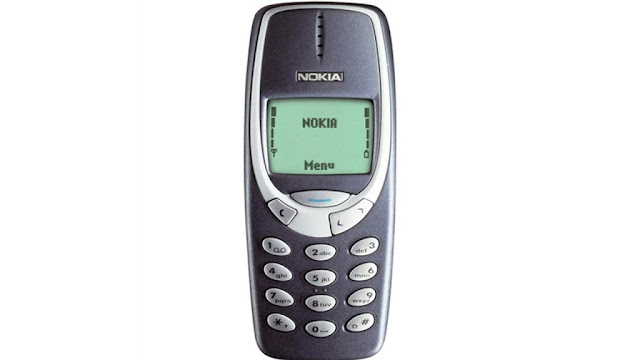
Not a lot of people had a mobile phone back in 2000, but if you did, chances are it was the Nokia 3310. Perhaps the most popular Nokia device, the 3310 still holds the benchmark for a smartphone’s durability and is extensively used in a host of internet memes even today. Regardless of how good mobile games might be today, they still fall short of the hours of fun Snake II had to offer.
Nokia 6600

The 6600 was a quirkily designed Nokia mobile phone which garnered huge success. Be it the ginormous VGA camera on the back or the support for Bluetooth and infrared, the 6600 had it all back in the day. Not to mention, the device came with a joystick instead of a D-pad which was compatible with certain games as well.
Nokia Communicator E90

Nokia revamped its iconic communicator series with the E90 which sported a laptop-like profile and dual-displays. The idea was that the smartphone could be used as a normal mobile phone with the flap closed and could offer extra room to enhance productivity with the larger 4-inch display that was housed within.
Nokia N95
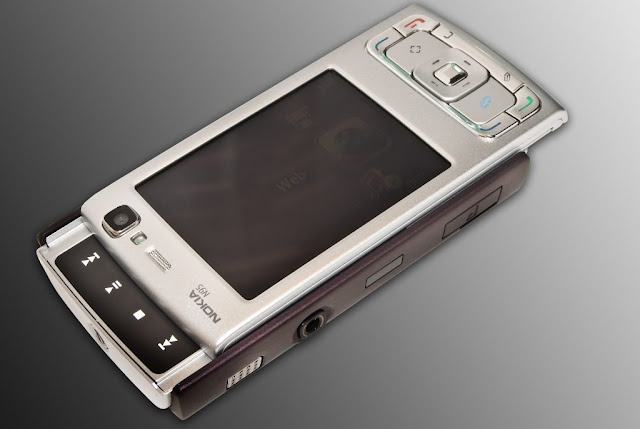
Nokia’s answer to Apple’s iPhone came in the form of N95, the most powerful smartphone for the year 2007. The device came with features like GPS along with a 5MP camera which was way ahead of its time. Toting a dual-slider form factor and support for 3.5G, the N95 was the biggest threat to Apple’s iPhone and a ‘flagship killer’ before the term was cool.
Nokia N900

The first and the only phone to run Linux-based Maemo OS, the Nokia N900 combined the productivity of the communicator series with the media-centric approach taken by the N series.
Nokia Pureview 808
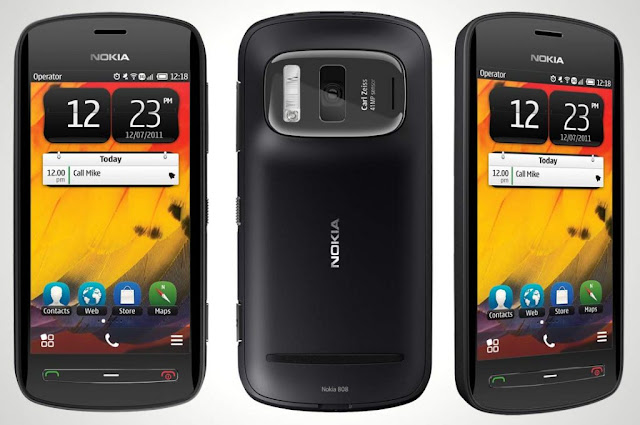
The USP of Nokia’s Pureview 808 was the massive 41MP camera sensor at the back, which to this date, is the biggest sensor to be housed within a smartphone. Aided with Pureview technology and Carl Zeiss optics, the device was capable of shooting some incredible stills. However, booting Symbian OS in 2012 made the 808 outdated before one could even open the box it shipped in.
Nokia X7

One of the frontrunners of Nokia’s Symbian^3 OS which was later renamed to Anna and then to Belle, the X7 brought some refreshing changes to the software side of things with support for portrait keyboard and improved browser experience.
Nokia E71

The iconic E series from Nokia was aimed to give business professionals something other than a Blackberry to gawk about. Jacketed in a metallic body, the E71 quickly became a fan favourite owing to its optimised email and messaging support. While not as media-centric as the N95 or the N97, the E71 still came with support for Wi-Fi, 3G and A-GPS.
Nokia 5800
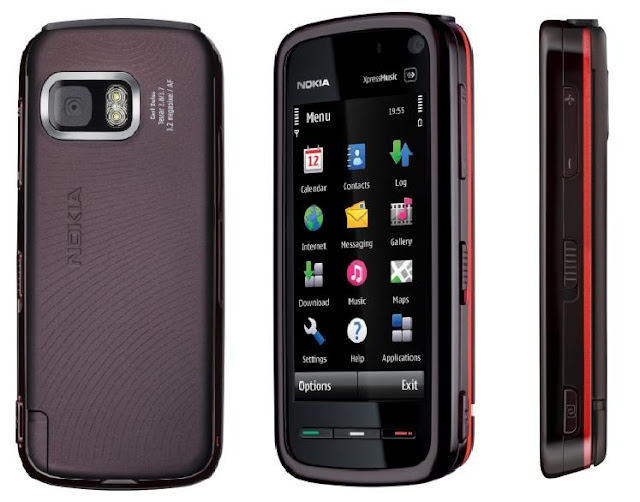
The phone which made a debut on the big screen with Christopher Nolan’s Dark Knight was the first all-touch smartphone from Nokia which came with an optimised version of the Symbian OS. The mobile phone was a huge hit in the Indian market and shipped with a 3.2MP autofocus camera with a Carl-Zeiss lens.
Nokia reigned as the king of the phone industry for a long period of time, before it eventually withered away and moved into the annals of cellphone history. While waiting for the next chapter in the Nokia’s book to unfold, we decided to travel back in time and take a look at some of the most iconic phones from the brand which we wouldn’t mind buying even today. So, grab some tissues as a wave of nostalgia is about to hit you.
Nokia 8110
Remember the scene in the first Matrix movie where Neo was escaping from agents in his office whilst talking to a mysterious man on a mobile phone? Well, the person Neo was talking to was Cypher and the phone he used was the Nokia 8110, which made news back in the day owing to its unique slider design which could be used to answer or end calls.
Nokia 3310
Not a lot of people had a mobile phone back in 2000, but if you did, chances are it was the Nokia 3310. Perhaps the most popular Nokia device, the 3310 still holds the benchmark for a smartphone’s durability and is extensively used in a host of internet memes even today. Regardless of how good mobile games might be today, they still fall short of the hours of fun Snake II had to offer.
Nokia 6600
The 6600 was a quirkily designed Nokia mobile phone which garnered huge success. Be it the ginormous VGA camera on the back or the support for Bluetooth and infrared, the 6600 had it all back in the day. Not to mention, the device came with a joystick instead of a D-pad which was compatible with certain games as well.
Nokia Communicator E90
Nokia revamped its iconic communicator series with the E90 which sported a laptop-like profile and dual-displays. The idea was that the smartphone could be used as a normal mobile phone with the flap closed and could offer extra room to enhance productivity with the larger 4-inch display that was housed within.
Nokia N95
Nokia’s answer to Apple’s iPhone came in the form of N95, the most powerful smartphone for the year 2007. The device came with features like GPS along with a 5MP camera which was way ahead of its time. Toting a dual-slider form factor and support for 3.5G, the N95 was the biggest threat to Apple’s iPhone and a ‘flagship killer’ before the term was cool.
Nokia N900
The first and the only phone to run Linux-based Maemo OS, the Nokia N900 combined the productivity of the communicator series with the media-centric approach taken by the N series.
Nokia Pureview 808
The USP of Nokia’s Pureview 808 was the massive 41MP camera sensor at the back, which to this date, is the biggest sensor to be housed within a smartphone. Aided with Pureview technology and Carl Zeiss optics, the device was capable of shooting some incredible stills. However, booting Symbian OS in 2012 made the 808 outdated before one could even open the box it shipped in.
Nokia X7
One of the frontrunners of Nokia’s Symbian^3 OS which was later renamed to Anna and then to Belle, the X7 brought some refreshing changes to the software side of things with support for portrait keyboard and improved browser experience.
Nokia E71
The iconic E series from Nokia was aimed to give business professionals something other than a Blackberry to gawk about. Jacketed in a metallic body, the E71 quickly became a fan favourite owing to its optimised email and messaging support. While not as media-centric as the N95 or the N97, the E71 still came with support for Wi-Fi, 3G and A-GPS.
Nokia 5800
The phone which made a debut on the big screen with Christopher Nolan’s Dark Knight was the first all-touch smartphone from Nokia which came with an optimised version of the Symbian OS. The mobile phone was a huge hit in the Indian market and shipped with a 3.2MP autofocus camera with a Carl-Zeiss lens.
Arya Z3 Smartphone Review
Salora International is now known to many as Arya Z1 and Arya Z2 smartphone were able to get some popularity. Now Salora has launched Arya Z3 smartphone and that too at the price of Rs .6,999/-only.
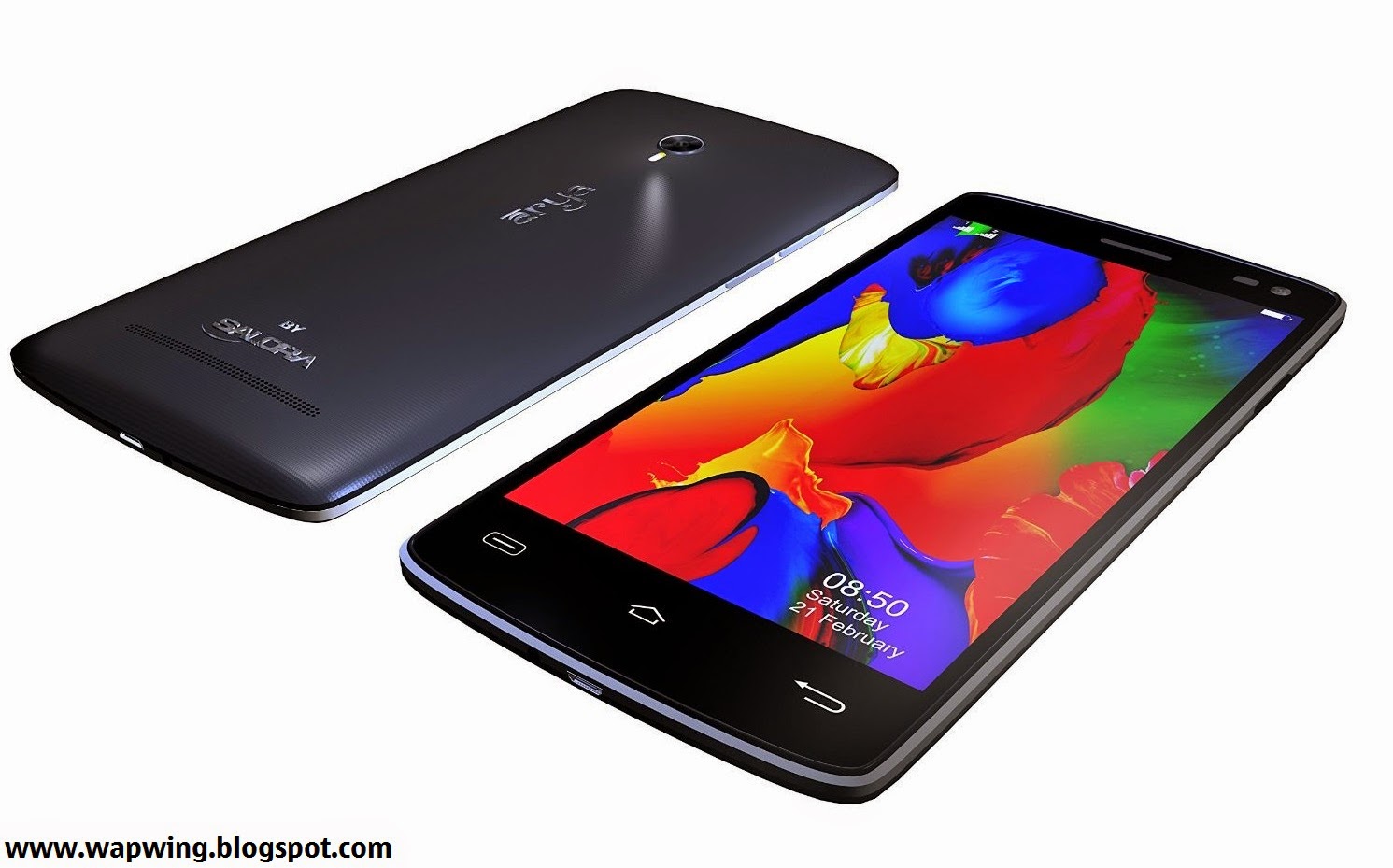
Price Rs- 6999/- INR
Arya Z3 is a powerful smartphone with decent features. You’ll be also able to find some unique features in this new smartphone by Salora. The Smartphone is available online, it will compete with Asus Zenfone 4.5, Lenovo A6000 and some other affordable Android smartphones. You may definitely do Arya Z3′s comparison with Lenovo A6000 and other smartphones of your choice.
Display Screen

Arya Z3 has 5 inch IPS HD OGS display having resolution of 1280 x 720 pixels. There is no Gorilla Glass provided, but full lamination has been provided by Salora to the display screen of this new smartphone.
Processor, RAM and Storage
Arya Z3 comes with 1.4GHz MediaTek MT6592 Octa Core processor. Lenovo A6000 which is also a latest low budget smartphone comes with more powerful 64 Bit Quad Core Qualcomm Snapdragon processor. Arya Z3 is provided with 1GB RAM. It comes with internal memory of 8GB which can be expanded upto 32GB via External SD card.
Arya Z3 Camera
Arya Z3 feature an 8 megapixel Auto-Focus rear camera with Ultra High Flash which will allow you to take good photographs even in low light. Other features provided are Smile Shot, Face Detection and Panorama Shot.
The Smartphone comes with a front facing camera of 2 megapixel. You’ll be definitely be able to take amazing selfies using the front facing camera.
Connectivity Features and Battery
2G, 3G, Wi-Fi, Bluetooth and GPS are the connectivity features provided in Arya Z3. It has even got OTG which is not provided in Lenovo A6000.Arya Z3 comes with 2200 mAh battery which can last upto 1 day with normal use.
HotKnot feature provided in Arya Z3 will allow you to share photos and videos easily. It has even got Gesture Control features which will allow you to do many things from the lock screen itself. Arya Z3 smartphone comes with sensors such as Gravity, Proximity and light sensor.
Check Out our Following Chart With Detailed Specifications of Arya Z3 Smartphone.

Price Rs- 6999/- INR
Arya Z3 is a powerful smartphone with decent features. You’ll be also able to find some unique features in this new smartphone by Salora. The Smartphone is available online, it will compete with Asus Zenfone 4.5, Lenovo A6000 and some other affordable Android smartphones. You may definitely do Arya Z3′s comparison with Lenovo A6000 and other smartphones of your choice.
Display Screen
Arya Z3 has 5 inch IPS HD OGS display having resolution of 1280 x 720 pixels. There is no Gorilla Glass provided, but full lamination has been provided by Salora to the display screen of this new smartphone.
Processor, RAM and Storage
Arya Z3 comes with 1.4GHz MediaTek MT6592 Octa Core processor. Lenovo A6000 which is also a latest low budget smartphone comes with more powerful 64 Bit Quad Core Qualcomm Snapdragon processor. Arya Z3 is provided with 1GB RAM. It comes with internal memory of 8GB which can be expanded upto 32GB via External SD card.
Arya Z3 Camera
Arya Z3 feature an 8 megapixel Auto-Focus rear camera with Ultra High Flash which will allow you to take good photographs even in low light. Other features provided are Smile Shot, Face Detection and Panorama Shot.
The Smartphone comes with a front facing camera of 2 megapixel. You’ll be definitely be able to take amazing selfies using the front facing camera.
Connectivity Features and Battery
2G, 3G, Wi-Fi, Bluetooth and GPS are the connectivity features provided in Arya Z3. It has even got OTG which is not provided in Lenovo A6000.Arya Z3 comes with 2200 mAh battery which can last upto 1 day with normal use.
HotKnot feature provided in Arya Z3 will allow you to share photos and videos easily. It has even got Gesture Control features which will allow you to do many things from the lock screen itself. Arya Z3 smartphone comes with sensors such as Gravity, Proximity and light sensor.
Check Out our Following Chart With Detailed Specifications of Arya Z3 Smartphone.
Instagram Layout Review
Instagram launches Layout, a standalone app for your photo collages
Now you can delete those dodgy third-party apps from your smartphone

The number of photo collages being uploaded to Instagram must have made Facebook sit up and take notice, because they've decided to launch an official Instagram app specifically to make franken-images.
Available now on iOS (an Android version will be released soon,can't say about Windows Phone), Layout differs from other collage-making apps before it by allowing more creative freedom. It's also much more polished and intuitive, which makes sense given it has Facebook's billions behind it. In fact, it's probably the best collage app around, right off the bat. Unless you actually prefer tacky frames and stickers, that is.
Instead of limiting users to fixed collage templates, Layout lets you customise arrangements based on how many photos you want in your collage, up to a limit of nine.
Besides being able to select from your phone's camera roll, it also included a Faces tab to display only photos of people, and a Recent tab for photos you've used Layout with, should you want to narrow down your options. It's not just images already on your phone though. There's also a Photo Booth option to make collages snap-by-snap so you can further tailor the overall look.

From there, it's just a matter of picking the basic configuration you want from an extensive selection, tweaking the images' position, size, and allocated space, and saving it to your camera roll. It's all really easy, with familiar gestures and grid lines.You also have the option of using the flip or mirror tools to add some creativity, so feel free to go nuts and fake your own twin or whatever.
You can then share your collage to Instagram and Facebook directly - with the former helpfully going straight to the filters selection screen - or to the iOS share sheet for use with other apps.
Seeing as it's only 10.5MB to install, we don't really know why Instagram hasn't baked Layout into its main app. Perhaps they're aiming to gauge users' reactions before making the call.
Now you can delete those dodgy third-party apps from your smartphone
The number of photo collages being uploaded to Instagram must have made Facebook sit up and take notice, because they've decided to launch an official Instagram app specifically to make franken-images.
Available now on iOS (an Android version will be released soon,can't say about Windows Phone), Layout differs from other collage-making apps before it by allowing more creative freedom. It's also much more polished and intuitive, which makes sense given it has Facebook's billions behind it. In fact, it's probably the best collage app around, right off the bat. Unless you actually prefer tacky frames and stickers, that is.
Instead of limiting users to fixed collage templates, Layout lets you customise arrangements based on how many photos you want in your collage, up to a limit of nine.
Besides being able to select from your phone's camera roll, it also included a Faces tab to display only photos of people, and a Recent tab for photos you've used Layout with, should you want to narrow down your options. It's not just images already on your phone though. There's also a Photo Booth option to make collages snap-by-snap so you can further tailor the overall look.
From there, it's just a matter of picking the basic configuration you want from an extensive selection, tweaking the images' position, size, and allocated space, and saving it to your camera roll. It's all really easy, with familiar gestures and grid lines.You also have the option of using the flip or mirror tools to add some creativity, so feel free to go nuts and fake your own twin or whatever.
You can then share your collage to Instagram and Facebook directly - with the former helpfully going straight to the filters selection screen - or to the iOS share sheet for use with other apps.
Seeing as it's only 10.5MB to install, we don't really know why Instagram hasn't baked Layout into its main app. Perhaps they're aiming to gauge users' reactions before making the call.
Micromax Canvas Selfie Review
The term Selfie can be defined as a self-photograph taken by a camera phone or any handheld camera. Today, ‘selfie’ has almost become a household term, with everyone posting selfies of almost every place they’ve been, the self obsession is very obviously an opportunity that smartphone makers are pouncing on.

Price-INR-15999/-
Micromax Canvas Selfie is their serious and focussed attempt on launching a selfie special smartphone. With 13 megapixel front camera, the Micromax Canvas Selfie is betting big on the megapixel way of judging a camera. And, the number play continues onto the processor as well, you get an Octa-core processor to support the 13MP camera. So, will more be merrier for the Micromax Canvas Selfie? Let’s find out!
Build & Design
Micromax’s build quality has hugely improved over the years and the Canvas Selfie is a pretty good example of that. The presence of a Gorilla Glass 3, a non removable back adds up to the phone’s sturdy build. All three physical buttons, power, volume rocker and the camera button feel and look well machined and have a nice click to them.

Moving on to the design, the phone is definitely a looker. Unlike being a regular rectangular slab, the Canvas Selfie features a curved top and bottom. This gives a nice design touch, reminds me of an old Motorola phone, the ROKR E8. Saying that, the enormous bezels at the top and bottom of the phone could have been minimized.

The front the display is well hidden when unlit giving the Canvas Selfie a nice mirror like sheen. The large camera at the back along with the dual flash may not go down well with some people, but it does make the phone look different. Overall, the Micromax Canvas Selfie is a sturdily built phone with some interesting design choices that make the phone stand-out from the regular pack of mid-range smartphones.
Display & UI
The 720p, 4.7-inch display on the Micromax Canvas Selfie looks good on paper but I found the display to be dim. Even on full brightness the screen failed to pop in terms of color and vibrance. Viewing angles and outside legibility are okay and the display is more at par with phones that are a segment below.

UI is another area where the phone disappoints. The custom UI is a step back from the spartan stock Android Micromax was offering on its previous phones. The UI feels cluttered and could be disorienting for existing Micromax users.
Performance
The Micromax canvas Selfie has the same MediaTek 6592 SoC as the one we saw on the Micromax Canvas Nitro. They even perform almost at par, hence the performance is satisfactory for its price segment, though not class leading by any stretch of imagination. And with 2GB of RAM on board, the phone does not feel bogged down on heavy usage or multitasking, there is enough room in terms of a smooth user experience even after you fill it up with dozens of apps.
Call quality is good and the sound quality via the built-in speakers is fairly loud. During my review period, the Micromax Canvas Selfie largely stayed manageable in terms of device temperature. Though prolonged gaming and camera usage can cause the device to quickly heat-up. An issue I also observed with the Micromax Canvas Nitro.
Camera & Battery

The smartphone boasts a 13MP camera at the rear and a 13 MP camera at the front and both camera sensors are made by Sony. Bringing the focus back on the star of the show (for Micromax), the 13MP front facing shooter for capturing selfies. I found pictures taken by the camera in suitable lighting to be good. While details and sharpness levels were good and noise levels were kept in control on most occasions, the colours felt a bit oversaturated. Images taken in low-light came out well in terms of overall quality, though the noise level was on the higher side, a typical case of low-light pics from small sensors that invariably results in ISO levels being pushed to the max to maintain fast shutter response..
The Canvas Selfie features software tricks to ‘beautify’ faces. The software makes your eyes larger, whitens the skin, slims down the face, removes oiliness and more. There is a entire range of make-up (editing) options as well. All of these features are available on both cameras which can used or applied and they work to an extent only. So, Whether you see it as an advantage or stuff that you’d rather live without is an individual choice. Overall, inspite of having its fair share of negatives, given its price-point, the Micromax Canvas Selfie is a good phone for SELFIE ENTHUSIASTS. The Micromax phone is priced a lot lower than HTC Desire Eye, the current champion of ‘selfie phones’. At 1/3rd the price, the Canvas Selfie offers a lot of value for selfie lovers. Though, you also need to consider the fact that the other aspects of the device aren’t class leading for its category and keeping the selfie aspect aside, you will find better phones in this price range.

Images taken by the rear 13MP camera delivered a similar result to the front-facing camera but with slightly better images at times. Pictures looked warmer with slight oversaturation and the only down side to the camera is the low-light performance. The dual-LED flash does help in low light but use of flash is recommended for situations when the subject is at a reasonable distance from the lens, ensuring images don’t end-up being over-blown due to the excessive light
One thing to add is that the phone heats up like a pan while using the camera. This was odd since it didn’t heat up as much when I played games on it.
The battery is another low point of the phone. In my battery test the smartphone was able to last just over five hours. When I used the phone as a daily driver with normal usage, the battery was out of juice by evening, which is not good enough by any standards.
Bottomline
The Micromax Canvas Selfie skimps on every other feature except the front-facing camera. So, if you want a “selfie” phone in a budget, this is your best choice but if you want more than that you should look elsewhere.
Price-INR-15999/-
Micromax Canvas Selfie is their serious and focussed attempt on launching a selfie special smartphone. With 13 megapixel front camera, the Micromax Canvas Selfie is betting big on the megapixel way of judging a camera. And, the number play continues onto the processor as well, you get an Octa-core processor to support the 13MP camera. So, will more be merrier for the Micromax Canvas Selfie? Let’s find out!
Build & Design
Micromax’s build quality has hugely improved over the years and the Canvas Selfie is a pretty good example of that. The presence of a Gorilla Glass 3, a non removable back adds up to the phone’s sturdy build. All three physical buttons, power, volume rocker and the camera button feel and look well machined and have a nice click to them.
Moving on to the design, the phone is definitely a looker. Unlike being a regular rectangular slab, the Canvas Selfie features a curved top and bottom. This gives a nice design touch, reminds me of an old Motorola phone, the ROKR E8. Saying that, the enormous bezels at the top and bottom of the phone could have been minimized.
The front the display is well hidden when unlit giving the Canvas Selfie a nice mirror like sheen. The large camera at the back along with the dual flash may not go down well with some people, but it does make the phone look different. Overall, the Micromax Canvas Selfie is a sturdily built phone with some interesting design choices that make the phone stand-out from the regular pack of mid-range smartphones.
Display & UI
The 720p, 4.7-inch display on the Micromax Canvas Selfie looks good on paper but I found the display to be dim. Even on full brightness the screen failed to pop in terms of color and vibrance. Viewing angles and outside legibility are okay and the display is more at par with phones that are a segment below.
UI is another area where the phone disappoints. The custom UI is a step back from the spartan stock Android Micromax was offering on its previous phones. The UI feels cluttered and could be disorienting for existing Micromax users.
Performance
The Micromax canvas Selfie has the same MediaTek 6592 SoC as the one we saw on the Micromax Canvas Nitro. They even perform almost at par, hence the performance is satisfactory for its price segment, though not class leading by any stretch of imagination. And with 2GB of RAM on board, the phone does not feel bogged down on heavy usage or multitasking, there is enough room in terms of a smooth user experience even after you fill it up with dozens of apps.
Call quality is good and the sound quality via the built-in speakers is fairly loud. During my review period, the Micromax Canvas Selfie largely stayed manageable in terms of device temperature. Though prolonged gaming and camera usage can cause the device to quickly heat-up. An issue I also observed with the Micromax Canvas Nitro.
Camera & Battery
The smartphone boasts a 13MP camera at the rear and a 13 MP camera at the front and both camera sensors are made by Sony. Bringing the focus back on the star of the show (for Micromax), the 13MP front facing shooter for capturing selfies. I found pictures taken by the camera in suitable lighting to be good. While details and sharpness levels were good and noise levels were kept in control on most occasions, the colours felt a bit oversaturated. Images taken in low-light came out well in terms of overall quality, though the noise level was on the higher side, a typical case of low-light pics from small sensors that invariably results in ISO levels being pushed to the max to maintain fast shutter response..
The Canvas Selfie features software tricks to ‘beautify’ faces. The software makes your eyes larger, whitens the skin, slims down the face, removes oiliness and more. There is a entire range of make-up (editing) options as well. All of these features are available on both cameras which can used or applied and they work to an extent only. So, Whether you see it as an advantage or stuff that you’d rather live without is an individual choice. Overall, inspite of having its fair share of negatives, given its price-point, the Micromax Canvas Selfie is a good phone for SELFIE ENTHUSIASTS. The Micromax phone is priced a lot lower than HTC Desire Eye, the current champion of ‘selfie phones’. At 1/3rd the price, the Canvas Selfie offers a lot of value for selfie lovers. Though, you also need to consider the fact that the other aspects of the device aren’t class leading for its category and keeping the selfie aspect aside, you will find better phones in this price range.
Images taken by the rear 13MP camera delivered a similar result to the front-facing camera but with slightly better images at times. Pictures looked warmer with slight oversaturation and the only down side to the camera is the low-light performance. The dual-LED flash does help in low light but use of flash is recommended for situations when the subject is at a reasonable distance from the lens, ensuring images don’t end-up being over-blown due to the excessive light
One thing to add is that the phone heats up like a pan while using the camera. This was odd since it didn’t heat up as much when I played games on it.
The battery is another low point of the phone. In my battery test the smartphone was able to last just over five hours. When I used the phone as a daily driver with normal usage, the battery was out of juice by evening, which is not good enough by any standards.
Bottomline
The Micromax Canvas Selfie skimps on every other feature except the front-facing camera. So, if you want a “selfie” phone in a budget, this is your best choice but if you want more than that you should look elsewhere.
WWE Immortals Android Game Review

I’m not sure there’s ever been a phrase that’s immediately piqued my curiosity more than “A WWE Game designed by the Mortal Kombat team.” NetherRealm has done something pretty interesting with WWE Immortals, conceptually, if not mechanically.
The collaboration between the MK studio and the WWE has brought us a free-to-play mobile title loaded with microtransactions on Apple’s iOS and Google’s Android stores. I think at this point we can skip the eyerolling and understand that’s how the market works for the most part on mobile platforms.
But what I found was a game with a cool central concept, and solid execution. Mobile is limiting factor in many ways, but working within those constraints, WWE Immortals is actually pretty damn well done.
Immortals twists the existing roster of WWE characters into something fantastical. As the brief introductory scene explains, when trying to take control of a dark magic lantern (stay with me) the Authority managed to open a portal to a host of alternate dimensions, ones where WWE stars aren’t just wrestlers, but heroes of all sorts.

As a result, we get WWE wrestlers with a wide range of new skins pulled from these parallel universes. Big Show is a barbarian Mountain Giant. Diva Brie Bella is an Ice Witch, Undertaker is a Necromancer. And so on. The different characters have alternate forms that draw from all sorts of fantasy, with a few going outside of those constraints, like Superhero John Cena, complete with cape.
You assemble a team of three, and face off against AI opponents or other players online. For now, I’ve been climbing the AI ladder, which starts of as cake, but slowly gets harder over time.
Combat is pretty simplistic, as you may expect on mobile. Outside of rare games like Infinity Blade, hand-to-hand combat in mobile games isn’t usually a terribly complex system, and NetherRealm isn’t trying to reinvent the wheel with WWE Immortals.
You tap to unleash a string of basic punch and kicks, and if you land a few, the game will prompt you to swipe a particular direction for a “heavy” attack. I was a bit disappointed to see that no matter which direction you swipe, it’s all the same attack animation, and it really doesn’t even seem to do much more damage than a basic attack, despite knocking your opponent over.
Past that, you can press two fingers to block, but so far I’ve only used that sparingly as I’ve steamrolled most opponents with a constant flurry of tapping. Dealing and taking damage with build your stamina meter, and each combatant has three levels of super attack. Many of these are comic book-ified versions of real-life movies the wrestlers do in the ring, meaning, for example, Roman Reign’s iconic Superman Punch now takes him ten feet into the air and slams him into his opponent with the force of a freight train. When you start, you only have your level one move, and you have to unlock the others over time, either through grinding or finding a lucky upgrade in a booster pack.
That’s right, booster pack.

There are many types of cards you can get, from fighters to upgrades to equipment. Fighters are tiered in Bronze, Silver and Gold categories. For instance, you start with the “Mountain Giant” version of Big Show, a bronze tier character, but when I spent most of my $10 on a Gold Pack of cards, I got a gold tier “Lumberjack” Big Show, that even at level 1, had triple the stats of my original Big Show, and a different level 2 unlockable super move as well.
Other cards will upgrade your special moves, or overall health or damage. You can get these upgrades in packs, which will give you a bundle card discount, but you rely on RNG luck to get what you want. For instance, the Gold Pack I bought was 75,000 coins, and came with Lumberjack Big Show and two other cards, but the gold tier wrestler would have cost me 192,000 coins by himself if I bought him individually. It’s an interesting dichotomy, and not a bad microtransaction system.
Naturally, it does take a very, very long time to save up for even something like a bronze tier pack (8,000 coins). I’m not quite sure how the game calculates its earnings (I think it’s based on your level vs. your opponents level, where wailing on lower tier characters will earn you less), but I only earn about 200 to 500 coins per 3-character match, and most of the time it’s been around 250 so far. This may increase in time, but for now, it’s slow going.

The game also does have a stamina system to prevent endless grinding, unless you pay to recharge your meter that is. But with ten stamina bars per character, and each match only costing one bar, you can play for a lot longer than most other F2P games before hitting that wall. Past that, if you have a halfway decently sized roster of fighters, you can swap out your exhausted team for a fresh one and keep fighting with more bars of stamina to work with.
Despite not being into fighting games all that much, being relatively annoyed by mobile in general, and leaving the WWE behind about a decade ago, I have to say, I kind of like Immortals. The concept of fantastical versions of WWE stars dressed up as centurions, warlords and demons makes my inner twelve year-old smile, and the combat/upgrade system is serviceable enough to keep me playing. It uses many of the same models as other F2P titles, but so far, doesn’t seem to be quite as annoying when nudging you toward the cash store.
If this is a hit, which I imagine it will be, given the WWE’s fanbase, I’m guessing the game will expand outward from here with more wrestlers, skins and so on. It’s really not a bad effort, simplistic as it may be, and something of a pleasant surprise in the space. Hell, I’d actually love to a see a console version.
CES 2015: Polaroid portable Zip printer
Bringing the essence of classic Polaroids into the modern era with minimal hassle

As with Kodak, the move towards digital photography wasn’t kind to Polaroid, but under new stewards, the company has made some interesting moves. And the Zip is its latest.
Polaroid’s Zip mobile printer is a compact, ink-free way
to print a photo from your iPhone or Android phone, and it appears to be
an updated version of the PoGo printer from several years back, although it's currently unclear if the changes are more than skin deep.
You’ll use Polaroid’s app - which has an array of editing
tools and filters - to get the photo wirelessly to the printer via
Bluetooth or NFC, and the image prints out within 60 seconds. It’s a
throwback to the iconic and utterly classic cameras Polaroid produced in
its heyday, and in more ways that one. Here, it’s all about the paper,
which has cyan, magenta, and yellow dyes built in that are activated
when the printer heats up. The result is a quality, smudge-free print -
and better yet, no need to replace cartridges.
What you will need to do, of course, is buy the
specialized paper. Bloomberg Businessweek says you’ll get a pack of 100
of the 2x3in photo paper sheets for about US$30 (£20), which isn’t
cheap, but also doesn’t seem terribly unreasonable if you’re choosy
about what you print. And each has a sticky back, so you can affix it a
wall, notebook, or an unsuspecting bystander’s trousers if desired.

The printer itself was created in collaboration with
ZINK Imaging (that’s “Zero Ink”), and is less than an inch thick with
dimensions otherwise not far off from a smartphone. According to
Polaroid, the built-in lithium-ion battery can print up to 25 photos on a
single charge.
Polaroid’s Zip mobile printer is due out this spring for US$129.99. about 8000 INR.
CES 2015: The Saygus V2 smartphone Preview
320GB storage, a 21MP camera, fingerprint scanning and a
4600mAh-equivalent battery. Too good to be true?

You haven't heard of Saygus yet, but if its claims are true, it's a name worth remembering.
On a simple stand tucked away at the back of the South
Hall, the Salt Lake City-based company is demoing its first smartphone,
the V2 (V squared). Founder Chad Sayers says that his team is composed
entirely of smartphone enthusiasts, and that the company makes nothing
but this smartphone - and that's why it couldn't help but design a
device that packs in every last bit of cutting edge tech they could lay
their mitts on.
The spec reads like a phone nerd's wish list, and includes
a few bits of neat-sounding technology we haven't seen before. A 5in,
1080p 'ArcticLink III' sunlight-readable screen. 64GB of built-in
storage, and two microSDXC slots, supporting up to 128GB a piece (that's
320GB of potential storage, folks). A side-mounted fingerprint scanner.
A 21MP rear camera and a 13MP front camera, both with optical image
stabilisation.
And there's more. NFC. An IR transmitter for TV control.
Harman/Kardon speakers. Built-in wireless Qi charging. Wireless HDMI
capability from Silicon Image. Some battery-boosting jiggery-pokery
claimed to make the 3100mAh battery perform like a 4600mAh unit. 4G LTE
too, of course, but augmented by technology from Fractal Antenna that
Chad Sayers claims will add a bar to your mobile reception wherever you
are.
Out of the box the V2 runs Android 4.4.4 and will be
updated to Lollipop in the near future, but interestingly the device can
boot other OSs from microSD too - Sailfish and Linux, for example.
The only unexceptional feature is the Qualcomm 801 chipset
inside, running at 2.5GHz - and even that's the equivalent of the
silicon inside pretty much every phone in our Top 10. Oh, and the screen
isn't 2K, but at 5in the extra pixels would be wasted anyway.
All of the above is housed in a IPX7 waterproof and
impressively compact aluminium and magnesium case with a carbon Kevlar
bumper around the screen and more carbon round the back. The tiny screen
bezel makes it feel like a smaller device than a 5in screen would
usually demand.
We're told the design is likely to be tweaked, which is no
bad thing - a sophisticated, HTC One (M8)-esque beauty this ain't. The
units we saw were rough around the edges and not representative of the
finished product, so it wasn't possible to get an idea of performance.
Really, all we have to go on are the claims of the press release - but
if they're true, this is going to be a device to watch very closely
indeed.
Saygus is aiming to have devices to market in February and
is already taking registrations for pre-orders. Stuff will be the first
region outside of the US to test the device - and you'll be first to
know if it lives up to that preposterous specification. We do hope so.
Asus Zenfone 2 First Impressions
Asus announced its ZenFone 2 Android handset at CES 2015
this week. It's a solid flagship phone that really only has two
features that make it stand out from a crowded field of smartphones, but
they're arguably the two most important features.

First, there's the processing guts of this phone, which is a 2.3GHz 64-bit Intel Atom processor with either 2 GB or 4 GB of RAM, making the top-end ZenFone 2 about as powerful as many laptops. Second is the highly competitive pricing that places this phone among the best value smartphones available. ASUS says the ZenFone 2 will start at $199 which is approx. 12500 INR. without a contract for a model with 2 GB RAM and 16 GB of storage.

That makes it an even better value than the $179 Moto G from Motorola for a new, more powerful phone shipping with Android 5.0 Lollipop, a 5.5-inch Full HD IPS display, 13 and 5 megapixel cameras and a fast-charging 3,000 mAh battery. Phone makers seem to be upping the ante with fast-charge technologies every few months, and Asus is no exception. The system in the ZenFone 2 claims to enable recharges to 60 percent battery level in only 39 minutes.
There are echoes of the HTC One M8 in the ZenFone 2's metal body design, with curves tapering to thin edges that define most of the top smartphones of the past year. It feels nice and light in the hand and the 403 pixels per inch of the display is bright and vivid enough. It's covered in Gorilla Glass 3 and an "anti-fingerprint coating" that is supposed to reduce friction and make it feel smoother as you slide your finger across it using the collection of "ZenMotion" gestures, one of the handful of not too intrusive tweaks to Android in Asus' ZenUI.

We didn't spend enough time with this phone to definitively say that the touch of this display was as "luxurious" as Asus claims, but that means that its implied superiority wasn't immediately obvious either.
As we said at the outset, little besides the price and a few key specs really make this phone stand out. But $199 is a great price for an off-contract phone with a 64-bit processor and the option to future-proof the ZenFone 2 further by upgrading to 4 GB of RAM.

At the same time, Asus also announced another phone for photophiles, the ZenPhone Zoom, which basically just gives a major upgrade to the rear 13 MP camera, adding a 3x optical zoom.
Specific details on dates of availability were scant, but the ZenFone 2 will need to roll out soon if it is going to remain nearly as great a bargain as it seems to be right now.
First, there's the processing guts of this phone, which is a 2.3GHz 64-bit Intel Atom processor with either 2 GB or 4 GB of RAM, making the top-end ZenFone 2 about as powerful as many laptops. Second is the highly competitive pricing that places this phone among the best value smartphones available. ASUS says the ZenFone 2 will start at $199 which is approx. 12500 INR. without a contract for a model with 2 GB RAM and 16 GB of storage.
That makes it an even better value than the $179 Moto G from Motorola for a new, more powerful phone shipping with Android 5.0 Lollipop, a 5.5-inch Full HD IPS display, 13 and 5 megapixel cameras and a fast-charging 3,000 mAh battery. Phone makers seem to be upping the ante with fast-charge technologies every few months, and Asus is no exception. The system in the ZenFone 2 claims to enable recharges to 60 percent battery level in only 39 minutes.
There are echoes of the HTC One M8 in the ZenFone 2's metal body design, with curves tapering to thin edges that define most of the top smartphones of the past year. It feels nice and light in the hand and the 403 pixels per inch of the display is bright and vivid enough. It's covered in Gorilla Glass 3 and an "anti-fingerprint coating" that is supposed to reduce friction and make it feel smoother as you slide your finger across it using the collection of "ZenMotion" gestures, one of the handful of not too intrusive tweaks to Android in Asus' ZenUI.
We didn't spend enough time with this phone to definitively say that the touch of this display was as "luxurious" as Asus claims, but that means that its implied superiority wasn't immediately obvious either.
As we said at the outset, little besides the price and a few key specs really make this phone stand out. But $199 is a great price for an off-contract phone with a 64-bit processor and the option to future-proof the ZenFone 2 further by upgrading to 4 GB of RAM.
At the same time, Asus also announced another phone for photophiles, the ZenPhone Zoom, which basically just gives a major upgrade to the rear 13 MP camera, adding a 3x optical zoom.
Specific details on dates of availability were scant, but the ZenFone 2 will need to roll out soon if it is going to remain nearly as great a bargain as it seems to be right now.
Top 3 Best Apps For Survivalists
If you really want to escape the 9-5 this summer, go feral
with the help of the best survivalism and exploration apps

Just because you love gadgets and tech it doesn't mean you
need to spend all summer sat in front of a glowing screen with your
headphones on.
Heading off into the wilderness to reconnect with Mother Nature can be a great way to recharge your batteries and prepare you for the inevitable depression that the long winter months will bring.
But while Ray Mears may be able to fashion an impregnable fortress out of a single twig and prepare a six-course banquet out of a grasshopper, the modern geek has a different weapon at their disposal: the smartphone.
Yes, these days you can indulge your survivalist fantasies while getting a helping hand from an app. These are the six we'd take with us into the wild.
1. Smart Compass
Heading off into the wilderness to reconnect with Mother Nature can be a great way to recharge your batteries and prepare you for the inevitable depression that the long winter months will bring.
But while Ray Mears may be able to fashion an impregnable fortress out of a single twig and prepare a six-course banquet out of a grasshopper, the modern geek has a different weapon at their disposal: the smartphone.
Yes, these days you can indulge your survivalist fantasies while getting a helping hand from an app. These are the six we'd take with us into the wild.
1. Smart Compass

Wapwing Says: ✭✭✭✭✩
Platform: Android Price: £free
2. SAS Survival Guide

Wapwing Says: ✭✭✭✭✭
Platform: Android, iOS, Windows Phone Price: from £2.59
Download SAS Survival Guide for Android here
Download SAS Survival Guide for iOS here
Download SAS Survival Guide for Windows Phone here
3. Magnificent Magnifier HD

This might not seem like an essential tool for a survivalist, but there are plenty of occasions when the ability to zoom in on some tiny detail will come in handy. There are loads of magnifying-glass apps out there, but we’d stick our pin in this one. It’s great for diagnosing vehicle breakdowns or making repairs in dark spaces, as well as improving legibility of maps or small print. And unlike with a normal magnifying glass, you won't need to juggle a torch at the same time when using it in the dark.
Wapwing Says: ✭✭✭✭✩
Platform: Android Price: £free
Gorilla Glass 4 Preview
Corning’s latest formulation is said to survive 80% of 1m falls onto rough surfaces

Our phones take a lot of everyday wear and tear, but it’s
usually a hard fall - a drop from fumbled hands or off of a countertop -
that warrants repair or replacement. But the new Gorilla Glass might
alleviate that.
Gorilla Glass 4 is the latest incarnation of the aluminosilicate glass display cover that debuted with the original iPhone back in 2007, and has since covered billions of devices. This time around, Corning focused on improving its ability to stay intact after a direct drop onto a rough surface.
As seen in the video below, Corning tested its durability by continually dropping Gorilla Glass 4-covered smartphones onto 180-grit sandpaper from 1 meter, which it believed best simulated the act of dropping a device from a bag or pocket onto a sidewalk or street.
Gorilla Glass 4 is the latest incarnation of the aluminosilicate glass display cover that debuted with the original iPhone back in 2007, and has since covered billions of devices. This time around, Corning focused on improving its ability to stay intact after a direct drop onto a rough surface.
As seen in the video below, Corning tested its durability by continually dropping Gorilla Glass 4-covered smartphones onto 180-grit sandpaper from 1 meter, which it believed best simulated the act of dropping a device from a bag or pocket onto a sidewalk or street.
Gorilla Glass 4 is already shipping to phone makers, and Corning expects devices bearing it to debut within the next three months.
With ambitions of using sapphire-covered displays for major, mass-market devices still something of a pipe dream, it’ll be interesting to see how long Gorilla Glass and its ilk remain the standard for screen protection.
Apple iPhone 7 Preview
Whether it's called the iPhone 7 or iPhone 6s, details
about Apple's next phone are already trickling out. Here's what we know
so far

While the iPhone 6 and iPhone 6 Plus have themselves only been out
for a few months, the iRumour mill has already begun spinning its
mysterious web of speculation about its successor.
Will it be called the iPhone 6s or the iPhone 7? Will it get another screen-size boost? Will it shoot 8K video from its 32MP camera?
In truth, we don't yet know. But as the first snippets of info about it leak out, we can make some educated guesses and hopefully help determine which of the rumours to believe.
So on this page we'll be gathering together all the speculation, all the hearsay and, occasionally, all the actual hard news about the Apple iPhone 7 or iPhone 6s or whatever it's called. Read on for all of the latest.
READ MORE: Apple iPhone 6 review
What's in a Name?
Will it be called the iPhone 6s or the iPhone 7? Will it get another screen-size boost? Will it shoot 8K video from its 32MP camera?
In truth, we don't yet know. But as the first snippets of info about it leak out, we can make some educated guesses and hopefully help determine which of the rumours to believe.
So on this page we'll be gathering together all the speculation, all the hearsay and, occasionally, all the actual hard news about the Apple iPhone 7 or iPhone 6s or whatever it's called. Read on for all of the latest.
READ MORE: Apple iPhone 6 review
What's in a Name?
Only the first two options are likely, and judging by Apple's past behaviour, we're more likely to end up with another 's' device. Then again, Apple could ditch that system altogether and go straight for the 7. It's known for its sporadic naming systems, after all.
What do we think? We're going with 7 right now, based on the fact that iPhone 6s Plus sounds stupid.
Likelihood: 75%
A Familiar Face
Still, that doesn't mean we can't have a little fun, does it?
Past rumours have pointed to liquidmetal being used to make up the iPhone's body, supported by an Apple patent outlining how the material could be used in future iPhones and watches.
The advanced alloy, made from a mix of aluminium, titanium, copper and nickel is more resistant to dents and scratches than aluminium itself.
While it sounds far-fetched, it's already used in some luxury watches and smartphones such as some of those made by Vertu.
Apple has also used the material to make some of its SIM ejector tools, as part of a low-risk test of its manufacturing capabilities. That may not represent absolute proof, but it's a good start.
Apart from fancy Terminator-like construction magic, we expect the lightning port, precision-drilled microspeakers and rounded corners to return.
Likelihood: 45%
The Screen
Size apart, it now looks less likely that the next iPhones will get sapphire displays.
Apple had been exploring the possibility of giving its iPhones sapphire screens for some time. Unscratchable to all things but diamond, a sapphire display would laugh in the face of keys, loose change, and even nails. Though why you'd be walking around with the latter jingling away in your pocket is beyond us.
Apple already uses sapphire to protect its Touch ID buttons and camera lenses from scratches, and the upcoming Apple Watch’s display will also be covered by the hardy stuff.
So the signs were there. Adding further fuel to the fire, Apple signed a multi-million dollar deal with GT Advanced Technologies in November 2013, providing it with the material and machinery to mass produce sapphire screens in larger numbers than ever.
However, that deal has now fallen through, and GT Advanced Technologies filed for bankruptcy last month. That doesn't mean we won't ever see a sapphire screen on an iPhone, but it seems unlikely that it'll make its way on to the iPhone 7, especially with all those sapphire-coated Apple Watches waiting in the wings.
Likelihood: 30%
Another possibility is the inclusion of a wraparound flexible display, Samsung Galaxy Note Edge-style, thanks to some Apple patents spotted earlier this year.
Designer Martin Hajek has rendered an edge-to-edge display that wraps around the home button. Because, well, why the hell not?
Failing that, we could, at the very least, see a reduction of the bezels, allowing the overall footprint of the device to shrink without cutting down the screen size.
Likelihood: 30%
And finally, of course, we have the resolution to consider. The iPhone 6s' screen is lovely, but it still has yet to reach the pixel-packed heights of a full HD display, let alone a 2K one.
We could see Apple grace the iPhone 7 Plus with a 2K screen and upgrade the standard iPhone 7 to 1080p. Stranger things have happened.
Likelihood: 75%
READ MORE: Samsung Galaxy S5 Mini review
The Best iPhone Camera Yet?
John Gruber, whose predictions have been accurate in the past, believes that "next year's camera might be the biggest camera jump ever".
According to his source, Apple is working on a two-lens system which somehow takes DSLR-quality photos.
It sounds too good to be true, but as Tech Radar points out, Sony - who supplies iPhones with camera modules - has already revealed a 21MP stacked CMOS sensor with 192-point autofocus for tracking and focusing on fast-moving objects.
Not so far-fetched now, is it? Well, maybe a bit, but we're swallowing plenty of salt while crossing our fingers all the same.
Likelihood: 30%
Megapixels aren't the only important factor however, and it would be great to see the optical image stabilisation of the 6 Plus make its way into the regular-sized iPhone 7.
That would allow for even better low-light shots, as the lens can remain open for longer, letting in more light, and throwing up more detail, without resulting in unusable blur.
Likelihood: 90%
More Muscle
It's clocked slightly faster at 1.5GHz, which, on paper, means 13% and 55% nippier performance in single-core and threaded-core operations respectively. Not to mention a more powerful GPU for even more graphical grunt in games.
No, numbers aren't the be-all and end-all, but if the iPhone 7 does get blessed with the A8X (and, ideally, 2GB of RAM while we're at it), then we're definitely not going to complain.
Likelihood: 90%
The iPhone 6 finally brought Apple into the world of NFC, but it has yet to dip its toes into the wireless charging pool. The Apple Watch does have wireless charging smarts however, so Apple could choose to transfer them over to the iPhone 7 too.
Likelihood: 70%
iOS 9
We don't expect any major aesthetical changes from iOS 8, especially after the last big overhaul for iOS 7, which is fine by us. It's still gorgeous, after all.
As for what we want to see? Well, not to beat a dead horse or anything, but widgets, and general home screen customisation (such as the launchers on Android) would be nice for people looking to stand out from the crowd.
The ability to default to third-party apps for certain tasks would be great, too.
Go on Apple. You finally gave us third-party keyboards. Why not go the whole way, eh?
READ MORE: Samsung Galaxy Alpha Review
Price and Release Date
If past launches are anything to go by, the iPhone 7 should be released around 20 September. There's no reason to expect prices to change much either, so we expect it to launch at the same £540 mark as the current iPhone 6.
We'll update this feature with news and rumours as they appear, so keep it bookmarked for all the latest.
Microsoft Surface Pro 3 Review

Microsoft’s new Surface Pro 3 alone may not wreck its maker
if it fails. But if it succeeds, it could be a welcome turning point for
a company that’s struggled for too long to out-innovate Apple and Google.
While on paper the Pro 3 is a humble range-filler (it takes the vacant slot at the super-size end of the Surface spectrum), it has enjoyed the kind of hype usually reserved for game-changing products.
This is perhaps because its various nips and tucks redefine the usability of the entire Surface concept.
For the Pro 3 to win, it must be usable everywhere, a brief that the Surface 2 and Surface Pro 2 fail to meet (stick a Surface 2 on your lap while sitting on a sofa with your legs crossed - silly, isn’t it?).
Next, the Surface Pro 3 must be a serious alternative to a Macbook Air or Lenovo Yoga 2 Pro. Again, the Surface Pro 2 fails on both fronts today, thanks to its compromised trackpad experience and less-than-ideal screen size and aspect ratio.
Lastly, the SP3 must be a good enough tablet to tempt away the masses heading for an iPad or Android 10-incher (ironically, this is the one area where the Surface 2 and Pro 2 have made some headway, thanks to the value they offer as powerful laptops).
No pressure here, then.
But despite the tough brief, the Pro 3 claims to meet each of those challenges in one, carefully refined package.
The Surface Pro 3 goes on sale in the UK on 28th August, and you can pre-order now at the Microsoft Store. We couldn't wait, so we picked one up in the US as soon as we could. Having now spent four weeks living with it we feel the time is right to answer the question that’s now on your lips: is it time to cancel that Macbook Air or iPad order?
READ MORE: Apple MacBook Air review
DESIGN: WHY DIDN'T THEY DO THIS IN THE FIRST PLACE?
While on paper the Pro 3 is a humble range-filler (it takes the vacant slot at the super-size end of the Surface spectrum), it has enjoyed the kind of hype usually reserved for game-changing products.
This is perhaps because its various nips and tucks redefine the usability of the entire Surface concept.
For the Pro 3 to win, it must be usable everywhere, a brief that the Surface 2 and Surface Pro 2 fail to meet (stick a Surface 2 on your lap while sitting on a sofa with your legs crossed - silly, isn’t it?).
Next, the Surface Pro 3 must be a serious alternative to a Macbook Air or Lenovo Yoga 2 Pro. Again, the Surface Pro 2 fails on both fronts today, thanks to its compromised trackpad experience and less-than-ideal screen size and aspect ratio.
Lastly, the SP3 must be a good enough tablet to tempt away the masses heading for an iPad or Android 10-incher (ironically, this is the one area where the Surface 2 and Pro 2 have made some headway, thanks to the value they offer as powerful laptops).
No pressure here, then.
But despite the tough brief, the Pro 3 claims to meet each of those challenges in one, carefully refined package.
The Surface Pro 3 goes on sale in the UK on 28th August, and you can pre-order now at the Microsoft Store. We couldn't wait, so we picked one up in the US as soon as we could. Having now spent four weeks living with it we feel the time is right to answer the question that’s now on your lips: is it time to cancel that Macbook Air or iPad order?
READ MORE: Apple MacBook Air review
DESIGN: WHY DIDN'T THEY DO THIS IN THE FIRST PLACE?

In place of the two-stage kickstand debuted by the Surface 2, the support now bends almost all the way back, using a brand new hinge design.
The Type Cover keyboard, meanwhile, can now be latched at its upper edge magnetically to the bottom of the SP3's screen, creating a rigid platform in place of the wobbly board that haunted previous Surfaces.
Those two changes transform the Surface into a good laptop that will work almost everywhere. With the kickstand bent back to 120-130 degrees and the keyboard attached, it works as well as any conventional laptop if you spend your life with your legs crossed on the sofa.
Tilt the kickstand back further to 140-150 degrees, and it's a perfectly-angled writing surface for use on a desk if you’re taking notes. In fact, we couldn't find a scenario where the Surface Pro 3 borked: it now works, really well.
The kickstand, in particular, is a minor engineering marvel. It retains the first two stages from the Surface 2; pull it away from the body, and there are two distinct locking points.
But push gently beyond the second lock point, and it will bend back to almost 150 degrees. We’re not irresponsible enough to give any view on the hinge’s long-term durability, but we will say that it feels beautifully made, and operates with the same well-damped smoothness after a hard month of use as it did on the day of opening the box.
The Type Cover 3, meanwhile, is a dramatic improvement over the Type Cover 2. The keyboard’s now spacious enough for big, clumsy fingers, and at last the trackpad is of a size and sensitivity that make it a pleasure to use. One thing, though: the keys clack if you’re typing in anger - but even then, the cheap-ish clack doesn’t infer shoddy build.
The kickstand and keyboard aren't the only changes for the better. Many (including us) found text too small on the 1920 x 1080 10in screen of the Surface 2 or Pro 2. So the switch to a 12in display at a rather unusual 2160 x 1440 resolution for the SP3 is welcome, as is the shift to a 3:2 aspect ratio. Somehow, the Pro 3 just looks and feels the right size (whatever that is), while its predecessors were too small to be taken that seriously.
The SP3's now natural to use in portrait mode (a claim you could never make for the Surface 2), making it a great (albeit large) ebook reader (which was one of Microsoft's stated intents with the 3: make it feel as much as possible like a good paper notebook).
PERFORMANCE: A GOOD LAPTOP, A BRILLIANT TABLET

That said, let’s be clear on one thing - the SP3’s no gaming rig. It will happily chomp through the lighter games you'll find in the Windows Store. But with only an Intel 4400 HD graphics chip on hand to push the pixels, it'll stammer to a halt if you fire up Crysis at max settings (at which point, you’ll also discover how hot the top right hand edge of the unit can get).
Avoid giving it that kind of abuse, and the SP3 will run quiet and cool. We did find that the top right of the tablet (or top left, if you're holding it in portrait mode) is always slightly warm (we'll assume that's where the i5 is housed), but it’s barely enough to register in normal use.
So which spec should you go for? After a month with the 128GB i5, we wished we'd chosen 8GB of RAM and the 256GB SSD.
While 4GB of RAM will keep Windows 8.1 running happily enough, the OS is happier with 6-8GB under the hood (and since the memory is soldered to the SP3's motherboard, you can't upgrade at a later date).
As for wishing that we’d gone for the 256GB hard drive, the Pro 3 has convinced us that it’s more than a toy - it's easily flexible enough to be used day in, day out, with the result that we’ve half filled the 128GB with our usual digital detritus.
There’s a well-hidden microSD slot tucked into the back of the Surface’s casing, enabling you to add up to 128GB of extra storage.
That’s all very well, but as of now, you cannot install Windows Store games to an external drive - and with some of those games weighing in at over 1GB (Halo: Spartan Assault is 1.6GB, for example), we’d still spend the extra for the comfort of 256GB of onboard space.
Microsoft Surface Pro 3 Tech Specs

The 12in screen is also commendably natural in the way it renders colours: its neither neutral to the point of being washed out, nor vivid in a way that'll give you a headache after an hour. It's just right.
And Microsoft has chosen a display that will go bright enough to ensure that your Surface will stay usable even in pretty bright daylight (just as well - the screen has a glossy coating that’s quite reflective).
Be aware that the driver for the Surface screen will only allow two resolutions - the native 2150 x1440, and a laughably old school 1024 x 768. Couple that with Windows 8.1’s, er, ‘interesting’ approach to DPI scaling, and be prepared to tweak before everything’s to your liking.
You should also know that quirks in that same DPI scaling can make life with an external monitor more arduous that it should be.
Our SP3 hooks up every day to the HDMI input of a 23in Philips 1080p desktop monitor, via the Pro 3’s mini display port. As regular as clockwork, we lose five minutes every morning to signing out and then in again once the Philips is connected, simply to re-scale the icons on the desktop. Annoying, and surely not that difficult for Microsoft to fix?

Thanks to the Surface Pro 3's new pen, Microsoft's note-taking, file-storing rival to Evernote gets a whole new lease of life.

Live with the SP3 for a bit, and the combination of the pen and OneNote feel as much a part of the everyday experience as the keyboard and kickstand. And you begin to appreciate that OneNote 2013 isn't that shoddy an application. It's great for taking and organising just about anything you throw at it, and the keyword search works a treat.
OneNote's only hitch, in our humble opinion, is its tight integration with Outlook 2013 for task management. If Microsoft really wants to own the productivity game (and it does), it needs a task manager that can sync to the cloud and every other mobile platform.
If you're still a desktop Outlook addict (there are some still out there… right?), you'll adore OneNote. But if you spend your days in one of the thousands of Android or iOS task managers, you'll find OneNote a bind. There are Microsoft-made OneNote apps for Android and iOS, sure, but they're no match for their Evernote equivalents.
Out of the box, your Surface Pro 3 will come with a small pen holder that's meant to attach to the Type Cover. Bluntly, it doesn't work.
After three or four days, we almost lost the pen after the tab holder detached itself without our noticing; the sticky part just isn't sticky enough to stay attached to the Type Cover, and a normal knock will send it flying.
We've taken to carrying the Surface pen around in a laptop case or shirt pocket. That guarantees that it will eventually go missing. Given how important the pen is to life with an SP3, Microsoft needs to come up with a more permanent, attractive solution - and fast
We’d also advise that you find a reliable local stockist of AAAA batteries before you invest in an SP3; the Surface pen is powered by a single AAAA, and we chewed through the power of the battery that came in the box in about four weeks (so let’s make that 12 batteries a year).
BATTERY LIFE: GREAT - AS LONG AS YOU’RE US…

The Surface Pro 3 has no such excuses. Its entire appeal rests on its flexibility - one minute hammering through a PhotoShop file at your desk, the next reading a Nook book on the morning commute. For the whole concept to stack up, you mustn’t feel nervous when taking it out for a day on the road.
Microsoft claims up to nine hours from the Pro 3’s lithium-ion battery ‘while browsing the web’, with careful warnings that your mileage may vary depending on your habits (and it's fair for Microsoft to hedge its bets here: a device as powerful as the Surface can indulge in some heavyweight, juice-sapping work).
Our i5, 128GB model is good for a working day, although we confess that we’ve yet to deliberately run it to red line.
In one day last week, it was unplugged from charge at 7am, then pounded at a conference from 9.30am to 4pm, before taking care of email and transcription duties on the 30-minute train ride home. By the time we re-attached it to a charger at 5.30pm, it was showing 30%. We’d call that good, by any standards.
But then, we’ve read enough forum posts from users suffering from disappointing SP3 battery life to feel blessed. What a forum post can’t tell you, of course, is what use the poster is putting the Surface to. What we can say is that heavy use - particularly video streaming - has a very visible effect on the SP3’s battery drain.
By the way, brownie points go to Microsoft for the design of the power supply. Too many 11-13in laptops come with leads and blocks that weigh more than the thing they power - the Pro 3’s is compact and light, and even includes a USB charging port in the power block.
PROBLEMS: YEP, THERE ARE SOME
But we’ve experienced none of the sleep or wake issues (bar one freeze that forced a hard shutdown - an update shortly after appears to have fixed it).
However, we did fall foul of one of the other commonly reported issues: flaky wireless. The latest update (July 16) claims to have sorted it for good. That claim looks to be accurate: our SP3 will now happily tether to our HTC One M8 (impossible before the update), and connect to the 2.4GHz wireless in Stuff Towers without constantly dropping.
There’s one other SP3 problem that Microsoft cannot fix alone (although with Windows 8.1 Update 2 coming down the tracks, they could sure as hell help).
The high dpi screen demands that developers update their software so that it renders correctly - and as it stands today, some significant developers have yet to catch up.
Until very recently, even Google Chrome looked awful at hi-dpi (the latest Chrome beta solves most of the issues). Dashlane, a popular password manager, displays as a boil-washed version of itself. Evernote desktop is usable, but ruined by miniature icons and smaller-than-needs-be text.
Developers are getting there, but we understand the Catch 22 from their point of view - it takes time and effort to make the software work well with high dpi displays, but the market for high-end PCs with displays that go beyond Full HD is hardly thriving.
Microsoft Surface Pro 3 Verdic
The Surface Pro 3 is excellent.
There, we said it. And with a straight face.
At last, Microsoft has delivered on the promise of the tablet-cum-laptop hybrid. It proves Microsoft's argument that there's space in the world for a design that's more productive than an iPad or Galaxy Note, but easier to hump around than a traditional laptop.
Would we buy one? Yes. We’d avoid the 64GB and 512GB models (you’ll either have no space left in a week, or regret paying the high price after a month). But put a 128GB or 256GB on the counter, and we'd tap in a PIN code without a moment's hesitation.
It would be daft not to point to the fact that the Windows Store still hasn’t reached the heights of the Play Store or iTunes, but that's an issue that's at least somewhat mitigated by the fast that Pro lets you install practically any piece of PC software on the desktop side of the two-faced OS.
Price still has to come into it. The i5 / 128GB SP3 £1000 asking price (with the Type Cover included) would buy an awful lot of Windows laptop, or a similarly-specced 13in Macbook Air with £100 change to spare.
But the Pro 3’s different enough to undermine absolutist comparisons: a chunk of that £1000 is going on ‘unusual’, and we think that for many it will justify itself on that basis. And if you insist on like-for-likes, the fact is that the Pro 3 is as quick and capable as either a Lenovo Yoga Pro 2 or a Macbook Air.
At last, there’s a Surface that’s right.
Google Nexus 9 Review

If there’s an Android contender to rival an iPad Air 2, this is it. The Nexus 9 has the same screen shape, the same resolution and – like the Apple tablet – launches with the very best its platform has to offer.
You get the brand new Android 5.0 Lollipop software, bags of power and a super-sharp display: all for £80 less than an iPad Air 2. It’s sure to lure thousands away from the Apple Store.
Just as important, though, is what the Nexus 9 does for Android. It sets the bar for future Android tablets, and sees Google finally embrace non-widescreen tablets. It’s been a long time coming.
The Tupperware of Tablets

There’s plenty of praise to come for the Nexus 9, but it’s not a tablet that sets out to wow you with its hardware design. Like the good old Nexus 7, it’s more practical than luxurious.The back is plastic, and has the sort of minimalist design a swedish furniture maker might come up with. Good-looking? Sure, but it doesn’t give the hard, expensive impression of the iPad Air 2, or offer the jaw-dropping thin-n-lightness of the Samsung Galaxy Tab S 8.4.You get the feeling Google cares a little more about what happens when you switch the screen on than what it feels like.That we can be so blasé about a tablet this thin and light tells you about how far we've come, though. The Nexus 9 is 7.9mm thick and weighs just 425g in its Wi-Fi only incarnation. It is thin and it is light, it just doesn’t showcase it in the same way the 6.1mm-thick iPad Air 2 does.That slight lack of initial impact is quickly forgotten when you start using the Nexus 9, though. The 4:3 aspect is so much better suited to an 8in-plus tablet than the widescreen styles that used to be the Android norm.Switch between this and the Nexus 10 and the older tablet just seems a bit, well, silly. It’s not just about the looks either, but how its weighting sits in your mitt. The Nexus 9 feels right, and is just about light enough to use one-handed while reading an article on the train on the way to work.In short, the Nexus 9 makes it pretty obvious why 10in widescreen tablets were never all that popular.
Google Nexus 9 Tech Specs

The size, the shape, the handling: we have no serious complaints. However, Google has deliberately limited you in one quite annoying way. There’s no memory card slot.
Of course, iPads have never had memory card slots, either - but the iPad Air 2 is available in 64GB and 128GB versions if you're the type that values on-board storage. The Nexus 9, on the other hand, maxes out at 32GB.
Casual users may well get by with the standard 16GB, but with only 10GB of it actually available to use once you factor in the OS, it’s soon gone if you load up a few games and movies. You can obviously bolster this with cloud storage from Google Drive or Dropbox, but it's not really the same thing. Don’t say we didn’t warn you.
LCD starlet
Just like the Nexus 7 before it, the Nexus 9 uses an IPS LCD screen, the same tech found in the iPad Air 2. The strong colour reproduction melded with the high resolution, bright backlight and very immediate image give the display plenty of pop.
However, purists will notice a few little issues. First, this is an LCD and its black levels aren’t close to what you get from an OLED tablet such as the Samsung Galaxy Tab S 8.4.
There’s also some pretty clear leakage from the backlight, particularly clear at the top of the Nexus 9. It exhibits as a tiny strip of brightness at the top of the screen. You should get used to it, but those with display OCD may find it distracting. It is fairly minor, but is another little negative to jot down if you’re after the ultimate Android tablet.
READ MORE: Lenovo Yoga Tablet 10 HD+ Review
What flavour is that Lollipop?

This is the first tablet to run Android 5.0 Lollipop, the version the rest of the Android-using world is going to be clamouring after for weeks or, more likely, months. So what’s it all about?
Android 5.0 Lollipop has a new look. It appears and feels familiar, but everything has been given a subtle facelift. The soft keys are new. The apps menu now looks like a series of white pages and you double-swipe down from the top of the screen to access quick settings toggles and screen brightness.
The lock screen is new, too, giving you notifications without having to take the tablet out of sleep mode. Very handy and about time. These are all things that we’ve seen before in other custom interfaces. It’s mostly just a neat, simple, quite cute UI – not a revolution.
Google has also reworked a bunch of the standard Android apps in the Nexus 9’s Android 5.0. Gmail, the Contacts book, Calendar and even the Play Store have all been given a spring clean.
But speaking of apps, it's also worth noting that many still aren't optimised for larger Android screens. Developers seem happy to produce different versions of their apps for iPhone and iPad, but many seem content to release just one for Android, which is then simply blown-up to fit tablet screens. That can have some ugly results.
But Lollipop is pretty elsewhere, with a colour palette that now has that extra hint of pastel to it. And everything moves with that extra bit of pep. Google seems to want the Nexus 9 to be something that would slide gracefully into an IKEA show home in its software as well as its hardware design.
Is it flat-out better than what you get with the Google Now interface available for just about any Android device these days? Maybe, but not by a huge margin.
What really matters is the stuff in the background – those turning cogs you can’t see on the surface. Android 5.0 now supports 64-bit processors and is better primed for connections to other devices than ever before. Our guess is that this means deeper integration with Android Wear watches, co-operation that we don’t even know about yet. For now, it means you can take up where you left off with media and apps in Lollipop goodies.
A lot of that promise is about the future, not right now. For example, while the Tegra K1 CPU used in the Nexus 9 is 64-bit, there’s nothing that specifically makes use of that more advanced architecture at present.
It’s not noticeably faster than previous top Android tablets, either. There’s the odd hint of lag here and there, undoubtedly because Android 5.0 Lollipop is a baby chick still brushing off those remaining bits of eggshell.
We imagine it’ll soon be improved in an update before too long, and it’s hardly bad at present anyway. Just the occasional stutter, and some apps not loading as fast as we’d like, especially given Android 5.0 uses a special ART runtime that’s meant to speed this whole process up. We’ll have a full review of Android 5.0 Lollipop up on wapwing.blogspot.com very soon.
The Numbers of The Beast
If you're a real power user you might be disappointed to find that hot-swapping is off the table. In fact, swapping of any kind seems unlikely - battery isn't just non-removable, it's glued in place behind a back cover you can’t rip off.
Papp-a-razzie

Walk around a major city and you’re sure to see loads of tourists taking loads of pictures with their tablet – probably iPads. But HTC and Google still seem to be working under the assumption tablet cameras aren’t too important.
We'd wouldn't necesarily argue with that, but if you are a tablet snapper you'll likely find that your greatest annoyance isn’t image quality but autofocus speed. It feels sluggish, not the sort of camera to whip out to capture your dog as it bounds across a park, flinging 360 degree drool. You’d probably end up with a photo of some grass. Maybe a tree if you’re lucky. The Nexus 9 is also prone to overexposing just about every cloud in the sky, too.
Approach the camera with patience and you can get some reasonable results with pretty decent colour saturation, but we'd recommend sticking to your phone camera unless you simply must let absolutely everyone see that you’re rocking the new Nexus.
Google Nexus 9 Verdict
But there are still some niggling flaws - the build isn’t up there with the likes of the iPad Air 2, storage is limited and at this early stage Lollipop is just a little stuttery.
Our other lingering regret is that the Nexus 9 and Nexus 6 show that the Google Nexus line isn’t the bargain-hunter’s paradise it used to be. Good value overall? Sure, but perhaps the real bargain right now is the £240 iPad Mini 2. Now there's a turn up for the books.