
Showing posts with label Android. Show all posts
Ringo:Now all STD & Local Calls @ 0.19 Rs.
Ringo, a popular voice calling app that arrived in India earlier this year, on Thursday announced that it is introducing new tariff charges for voice calls in the country. The company says that using its services, people will be able to make calls across the country - local as well as STD -- at Rs. 0.19 per minute.

The app, which debuted its service last year in over a dozen regions, offers voice calls at Rs. 0.19 per minute. In comparison, popular telecom operators such as Airtel, Vodafone, Idea charge roughly around Rs. 1.20 per minute for STD calls, and Rs. 0.40 per minute with any special tariff plan. Ringo claims that users can reduce their talk time cost by up to 90 percent using its service.
So how does Ringo work?
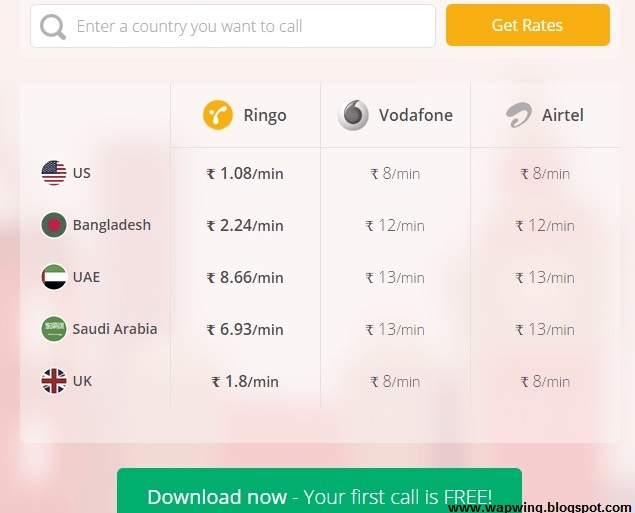
A user first needs to download Ringo app, and tap on the person he or she wishes to call. Instead of the user talking to that person directly, as the company mentions on its website, Ringo calls that person and connects the user to that contact. For this reason, recipients don't need to have the app installed on their handset, and voice calls work without a reliable data connection.
Bhavin Turakhia, CEO and Founder of Ringo said:
"Our vision has been to make calling across the globe simple, seamless and low-cost for the masses. Our local calling service is not only the cheapest in India right now, but it is also free of typical telecom-related hassles such as STD charges and differential pricing,"."In a country where 3G penetration is not fairly high throughout, we also have a strong edge over Internet telephony apps, as Ringo calls do not use data, and are comparable in price."

We tested the app earlier this year and found it as good as advertised, though it is not 'completely Internet-free'. Ringo worked reliably and didn't have an issue even on spotty data networks. You can download the app for your Android phone from the Google Play Store, for your iPhone from the App Store, and for your Windows Phone handset from the Windows Phone Store.
Download Ringo App Now And Get 50 Local/STD Minutes Free Click to Download Now
The app, which debuted its service last year in over a dozen regions, offers voice calls at Rs. 0.19 per minute. In comparison, popular telecom operators such as Airtel, Vodafone, Idea charge roughly around Rs. 1.20 per minute for STD calls, and Rs. 0.40 per minute with any special tariff plan. Ringo claims that users can reduce their talk time cost by up to 90 percent using its service.
So how does Ringo work?
A user first needs to download Ringo app, and tap on the person he or she wishes to call. Instead of the user talking to that person directly, as the company mentions on its website, Ringo calls that person and connects the user to that contact. For this reason, recipients don't need to have the app installed on their handset, and voice calls work without a reliable data connection.
Bhavin Turakhia, CEO and Founder of Ringo said:
"Our vision has been to make calling across the globe simple, seamless and low-cost for the masses. Our local calling service is not only the cheapest in India right now, but it is also free of typical telecom-related hassles such as STD charges and differential pricing,"."In a country where 3G penetration is not fairly high throughout, we also have a strong edge over Internet telephony apps, as Ringo calls do not use data, and are comparable in price."
We tested the app earlier this year and found it as good as advertised, though it is not 'completely Internet-free'. Ringo worked reliably and didn't have an issue even on spotty data networks. You can download the app for your Android phone from the Google Play Store, for your iPhone from the App Store, and for your Windows Phone handset from the Windows Phone Store.
Download Ringo App Now And Get 50 Local/STD Minutes Free Click to Download Now
How to Root Asus Zenfone 5 Running Android Lollipop 5.0
How to root Asus ZenFone 5 on Android Lollipop(Asus)

A one-click root method is available for ZenFone 5 to help advanced users who are looking for a guide to gain root access after the Android Lollipop upgrade which Asus released recently with software version 3.23.40.52.
This root requires nothing but a click on the keyboard that will start the process. But note that you should have T00F and T00J WW variants of ZenFone 5 which are compatible with this tool. Check out the following step-by-step guide to root ZenFone 5.
Key points:
.The following root method is applicable for ZenFone 5 T00F/T00J WW models only.
.Do not use this on any other device.
.Ensure that you have created a backup of all the data of your phone, as the root method is likely to wipe out everything.
.Note that rooting the device will void the manufacturer's warranty.
.The battery of the phone should have at least 80% charge, to avoid any sudden shut down due to lack of power, which could damage the device.
.Wapwing.blogspot.com will not be liable for any damage to the device during the process. Proceed at your own risk.
How to root Asus ZenFone 5 on Android Lollipop
Step-1: Download root file for ZenFone 5
Download link: ZenFoneRootKit_20150528.zip
Step-2: Extract the root package on your PC using a tool like 7-zip
Step-3: Install ADB drivers on the PC
Step-4: Enable USB debugging on the phone
Go to Settings>> About phone>> Software information and tap on build number seven times
Go to Settings then Developer options, from there enable the USB debugging
Go to Settings then Developer options, from there enable the USB debugging
Step-5: Connect the ZenFone to the PC using a USB cable. You should get a pop-up saying Allow USB debugging on the phone. Tick the check box that says Always allow for this computer and press OK
Step-6: With the phone connected to the PC, run the Root.bat file. Just double click on the file to run it. For Linux and Mac, run root.sh file
Step-7: Your phone will now reboot into fastboot mode automatically and then start flashing the root files. Once the process is completed, the phone will reboot automatically
You can confirm the root access on your phone by downloading the root checker app from the Play Store. Just open the app and tap on Verify Root and grant root access.
Arya Z3 Smartphone Review
Salora International is now known to many as Arya Z1 and Arya Z2 smartphone were able to get some popularity. Now Salora has launched Arya Z3 smartphone and that too at the price of Rs .6,999/-only.
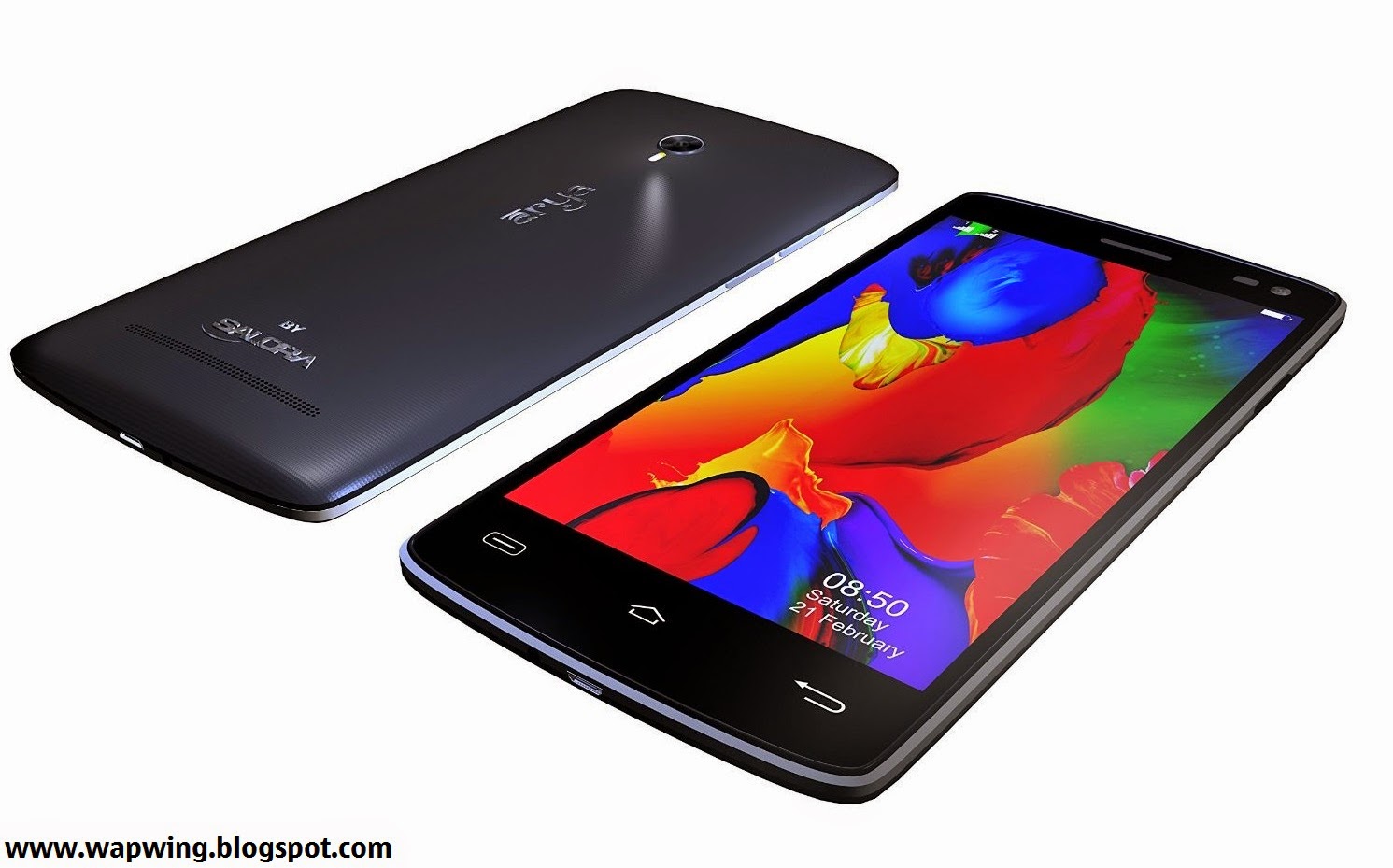
Price Rs- 6999/- INR
Arya Z3 is a powerful smartphone with decent features. You’ll be also able to find some unique features in this new smartphone by Salora. The Smartphone is available online, it will compete with Asus Zenfone 4.5, Lenovo A6000 and some other affordable Android smartphones. You may definitely do Arya Z3′s comparison with Lenovo A6000 and other smartphones of your choice.
Display Screen

Arya Z3 has 5 inch IPS HD OGS display having resolution of 1280 x 720 pixels. There is no Gorilla Glass provided, but full lamination has been provided by Salora to the display screen of this new smartphone.
Processor, RAM and Storage
Arya Z3 comes with 1.4GHz MediaTek MT6592 Octa Core processor. Lenovo A6000 which is also a latest low budget smartphone comes with more powerful 64 Bit Quad Core Qualcomm Snapdragon processor. Arya Z3 is provided with 1GB RAM. It comes with internal memory of 8GB which can be expanded upto 32GB via External SD card.
Arya Z3 Camera
Arya Z3 feature an 8 megapixel Auto-Focus rear camera with Ultra High Flash which will allow you to take good photographs even in low light. Other features provided are Smile Shot, Face Detection and Panorama Shot.
The Smartphone comes with a front facing camera of 2 megapixel. You’ll be definitely be able to take amazing selfies using the front facing camera.
Connectivity Features and Battery
2G, 3G, Wi-Fi, Bluetooth and GPS are the connectivity features provided in Arya Z3. It has even got OTG which is not provided in Lenovo A6000.Arya Z3 comes with 2200 mAh battery which can last upto 1 day with normal use.
HotKnot feature provided in Arya Z3 will allow you to share photos and videos easily. It has even got Gesture Control features which will allow you to do many things from the lock screen itself. Arya Z3 smartphone comes with sensors such as Gravity, Proximity and light sensor.
Check Out our Following Chart With Detailed Specifications of Arya Z3 Smartphone.

Price Rs- 6999/- INR
Arya Z3 is a powerful smartphone with decent features. You’ll be also able to find some unique features in this new smartphone by Salora. The Smartphone is available online, it will compete with Asus Zenfone 4.5, Lenovo A6000 and some other affordable Android smartphones. You may definitely do Arya Z3′s comparison with Lenovo A6000 and other smartphones of your choice.
Display Screen
Arya Z3 has 5 inch IPS HD OGS display having resolution of 1280 x 720 pixels. There is no Gorilla Glass provided, but full lamination has been provided by Salora to the display screen of this new smartphone.
Processor, RAM and Storage
Arya Z3 comes with 1.4GHz MediaTek MT6592 Octa Core processor. Lenovo A6000 which is also a latest low budget smartphone comes with more powerful 64 Bit Quad Core Qualcomm Snapdragon processor. Arya Z3 is provided with 1GB RAM. It comes with internal memory of 8GB which can be expanded upto 32GB via External SD card.
Arya Z3 Camera
Arya Z3 feature an 8 megapixel Auto-Focus rear camera with Ultra High Flash which will allow you to take good photographs even in low light. Other features provided are Smile Shot, Face Detection and Panorama Shot.
The Smartphone comes with a front facing camera of 2 megapixel. You’ll be definitely be able to take amazing selfies using the front facing camera.
Connectivity Features and Battery
2G, 3G, Wi-Fi, Bluetooth and GPS are the connectivity features provided in Arya Z3. It has even got OTG which is not provided in Lenovo A6000.Arya Z3 comes with 2200 mAh battery which can last upto 1 day with normal use.
HotKnot feature provided in Arya Z3 will allow you to share photos and videos easily. It has even got Gesture Control features which will allow you to do many things from the lock screen itself. Arya Z3 smartphone comes with sensors such as Gravity, Proximity and light sensor.
Check Out our Following Chart With Detailed Specifications of Arya Z3 Smartphone.