
Showing posts with label Android. Show all posts
Ringo:Now all STD & Local Calls @ 0.19 Rs.
Ringo, a popular voice calling app that arrived in India earlier this year, on Thursday announced that it is introducing new tariff charges for voice calls in the country. The company says that using its services, people will be able to make calls across the country - local as well as STD -- at Rs. 0.19 per minute.

The app, which debuted its service last year in over a dozen regions, offers voice calls at Rs. 0.19 per minute. In comparison, popular telecom operators such as Airtel, Vodafone, Idea charge roughly around Rs. 1.20 per minute for STD calls, and Rs. 0.40 per minute with any special tariff plan. Ringo claims that users can reduce their talk time cost by up to 90 percent using its service.
So how does Ringo work?
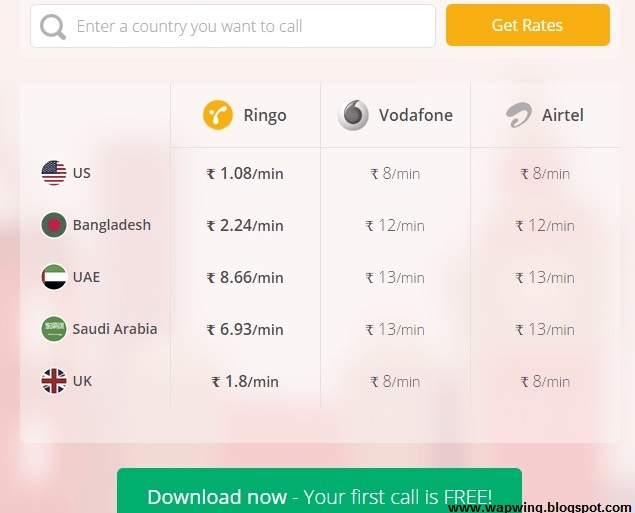
A user first needs to download Ringo app, and tap on the person he or she wishes to call. Instead of the user talking to that person directly, as the company mentions on its website, Ringo calls that person and connects the user to that contact. For this reason, recipients don't need to have the app installed on their handset, and voice calls work without a reliable data connection.
Bhavin Turakhia, CEO and Founder of Ringo said:
"Our vision has been to make calling across the globe simple, seamless and low-cost for the masses. Our local calling service is not only the cheapest in India right now, but it is also free of typical telecom-related hassles such as STD charges and differential pricing,"."In a country where 3G penetration is not fairly high throughout, we also have a strong edge over Internet telephony apps, as Ringo calls do not use data, and are comparable in price."

We tested the app earlier this year and found it as good as advertised, though it is not 'completely Internet-free'. Ringo worked reliably and didn't have an issue even on spotty data networks. You can download the app for your Android phone from the Google Play Store, for your iPhone from the App Store, and for your Windows Phone handset from the Windows Phone Store.
Download Ringo App Now And Get 50 Local/STD Minutes Free Click to Download Now
The app, which debuted its service last year in over a dozen regions, offers voice calls at Rs. 0.19 per minute. In comparison, popular telecom operators such as Airtel, Vodafone, Idea charge roughly around Rs. 1.20 per minute for STD calls, and Rs. 0.40 per minute with any special tariff plan. Ringo claims that users can reduce their talk time cost by up to 90 percent using its service.
So how does Ringo work?
A user first needs to download Ringo app, and tap on the person he or she wishes to call. Instead of the user talking to that person directly, as the company mentions on its website, Ringo calls that person and connects the user to that contact. For this reason, recipients don't need to have the app installed on their handset, and voice calls work without a reliable data connection.
Bhavin Turakhia, CEO and Founder of Ringo said:
"Our vision has been to make calling across the globe simple, seamless and low-cost for the masses. Our local calling service is not only the cheapest in India right now, but it is also free of typical telecom-related hassles such as STD charges and differential pricing,"."In a country where 3G penetration is not fairly high throughout, we also have a strong edge over Internet telephony apps, as Ringo calls do not use data, and are comparable in price."
We tested the app earlier this year and found it as good as advertised, though it is not 'completely Internet-free'. Ringo worked reliably and didn't have an issue even on spotty data networks. You can download the app for your Android phone from the Google Play Store, for your iPhone from the App Store, and for your Windows Phone handset from the Windows Phone Store.
Download Ringo App Now And Get 50 Local/STD Minutes Free Click to Download Now
How to Root Asus Zenfone 5 Running Android Lollipop 5.0
How to root Asus ZenFone 5 on Android Lollipop(Asus)

A one-click root method is available for ZenFone 5 to help advanced users who are looking for a guide to gain root access after the Android Lollipop upgrade which Asus released recently with software version 3.23.40.52.
This root requires nothing but a click on the keyboard that will start the process. But note that you should have T00F and T00J WW variants of ZenFone 5 which are compatible with this tool. Check out the following step-by-step guide to root ZenFone 5.
Key points:
.The following root method is applicable for ZenFone 5 T00F/T00J WW models only.
.Do not use this on any other device.
.Ensure that you have created a backup of all the data of your phone, as the root method is likely to wipe out everything.
.Note that rooting the device will void the manufacturer's warranty.
.The battery of the phone should have at least 80% charge, to avoid any sudden shut down due to lack of power, which could damage the device.
.Wapwing.blogspot.com will not be liable for any damage to the device during the process. Proceed at your own risk.
How to root Asus ZenFone 5 on Android Lollipop
Step-1: Download root file for ZenFone 5
Download link: ZenFoneRootKit_20150528.zip
Step-2: Extract the root package on your PC using a tool like 7-zip
Step-3: Install ADB drivers on the PC
Step-4: Enable USB debugging on the phone
Go to Settings>> About phone>> Software information and tap on build number seven times
Go to Settings then Developer options, from there enable the USB debugging
Go to Settings then Developer options, from there enable the USB debugging
Step-5: Connect the ZenFone to the PC using a USB cable. You should get a pop-up saying Allow USB debugging on the phone. Tick the check box that says Always allow for this computer and press OK
Step-6: With the phone connected to the PC, run the Root.bat file. Just double click on the file to run it. For Linux and Mac, run root.sh file
Step-7: Your phone will now reboot into fastboot mode automatically and then start flashing the root files. Once the process is completed, the phone will reboot automatically
You can confirm the root access on your phone by downloading the root checker app from the Play Store. Just open the app and tap on Verify Root and grant root access.
Arya Z3 Smartphone Review
Salora International is now known to many as Arya Z1 and Arya Z2 smartphone were able to get some popularity. Now Salora has launched Arya Z3 smartphone and that too at the price of Rs .6,999/-only.
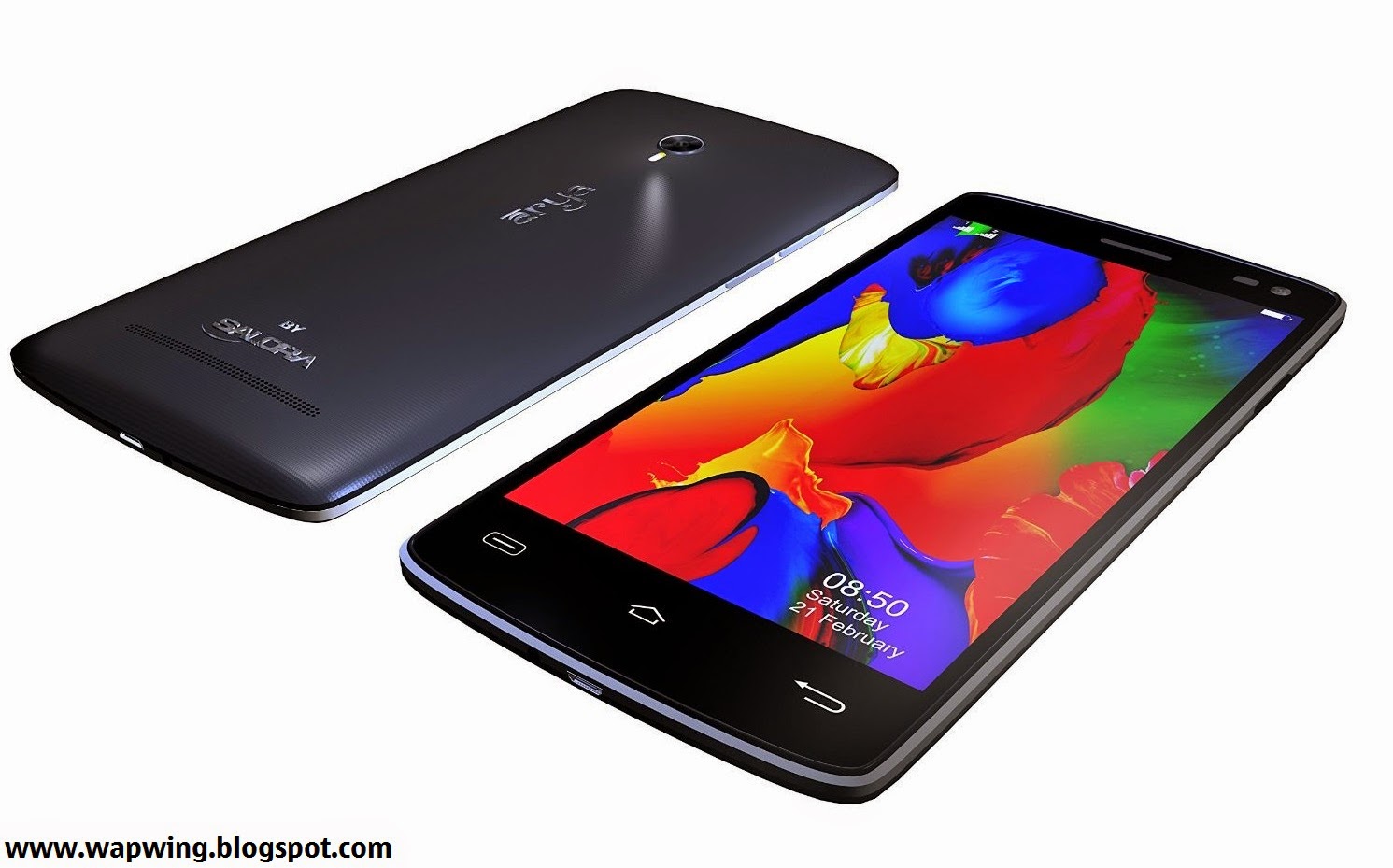
Price Rs- 6999/- INR
Arya Z3 is a powerful smartphone with decent features. You’ll be also able to find some unique features in this new smartphone by Salora. The Smartphone is available online, it will compete with Asus Zenfone 4.5, Lenovo A6000 and some other affordable Android smartphones. You may definitely do Arya Z3′s comparison with Lenovo A6000 and other smartphones of your choice.
Display Screen

Arya Z3 has 5 inch IPS HD OGS display having resolution of 1280 x 720 pixels. There is no Gorilla Glass provided, but full lamination has been provided by Salora to the display screen of this new smartphone.
Processor, RAM and Storage
Arya Z3 comes with 1.4GHz MediaTek MT6592 Octa Core processor. Lenovo A6000 which is also a latest low budget smartphone comes with more powerful 64 Bit Quad Core Qualcomm Snapdragon processor. Arya Z3 is provided with 1GB RAM. It comes with internal memory of 8GB which can be expanded upto 32GB via External SD card.
Arya Z3 Camera
Arya Z3 feature an 8 megapixel Auto-Focus rear camera with Ultra High Flash which will allow you to take good photographs even in low light. Other features provided are Smile Shot, Face Detection and Panorama Shot.
The Smartphone comes with a front facing camera of 2 megapixel. You’ll be definitely be able to take amazing selfies using the front facing camera.
Connectivity Features and Battery
2G, 3G, Wi-Fi, Bluetooth and GPS are the connectivity features provided in Arya Z3. It has even got OTG which is not provided in Lenovo A6000.Arya Z3 comes with 2200 mAh battery which can last upto 1 day with normal use.
HotKnot feature provided in Arya Z3 will allow you to share photos and videos easily. It has even got Gesture Control features which will allow you to do many things from the lock screen itself. Arya Z3 smartphone comes with sensors such as Gravity, Proximity and light sensor.
Check Out our Following Chart With Detailed Specifications of Arya Z3 Smartphone.

Price Rs- 6999/- INR
Arya Z3 is a powerful smartphone with decent features. You’ll be also able to find some unique features in this new smartphone by Salora. The Smartphone is available online, it will compete with Asus Zenfone 4.5, Lenovo A6000 and some other affordable Android smartphones. You may definitely do Arya Z3′s comparison with Lenovo A6000 and other smartphones of your choice.
Display Screen
Arya Z3 has 5 inch IPS HD OGS display having resolution of 1280 x 720 pixels. There is no Gorilla Glass provided, but full lamination has been provided by Salora to the display screen of this new smartphone.
Processor, RAM and Storage
Arya Z3 comes with 1.4GHz MediaTek MT6592 Octa Core processor. Lenovo A6000 which is also a latest low budget smartphone comes with more powerful 64 Bit Quad Core Qualcomm Snapdragon processor. Arya Z3 is provided with 1GB RAM. It comes with internal memory of 8GB which can be expanded upto 32GB via External SD card.
Arya Z3 Camera
Arya Z3 feature an 8 megapixel Auto-Focus rear camera with Ultra High Flash which will allow you to take good photographs even in low light. Other features provided are Smile Shot, Face Detection and Panorama Shot.
The Smartphone comes with a front facing camera of 2 megapixel. You’ll be definitely be able to take amazing selfies using the front facing camera.
Connectivity Features and Battery
2G, 3G, Wi-Fi, Bluetooth and GPS are the connectivity features provided in Arya Z3. It has even got OTG which is not provided in Lenovo A6000.Arya Z3 comes with 2200 mAh battery which can last upto 1 day with normal use.
HotKnot feature provided in Arya Z3 will allow you to share photos and videos easily. It has even got Gesture Control features which will allow you to do many things from the lock screen itself. Arya Z3 smartphone comes with sensors such as Gravity, Proximity and light sensor.
Check Out our Following Chart With Detailed Specifications of Arya Z3 Smartphone.
Step By Step Guide to Root Asus Zenfone 5 on Android Kit-Kat
Root with your own risk

Warning : I will not be held liable for any damage on your device. It may void your warranty.
This Method is Only For Android KitKat 4.4
For Android Jellybean 4.3 checkout this Method Click HERE.
You need for this rooting method
1. Root z5 kitkat v2
2. Intel driver
3. USB Cable
4. Windows pc
I am using windows 7 for this work.
Root z5 kitkat v2 download links:
http://www.mediafire.com/download/p5...one5KitKat.zip
Alternate links : 1. http://www.mediafire.com/download/wn...e5KitKatv2.zip
2. https://www.asuswebstorage.com/navig...B621E634114C6Y
Intel driver download links:
1. http://www.mediafire.com/download/4m...Setup1.1.5.exe
OR
2. http://d-h.st/VfO
Root Kitkat Zenfone 5 ver 2.21.40.44 download links:
1. http://www76.zippyshare.com/v/tVA4DcDx/file.html
2. http://www.4shared.com/zip/-dmbfJCHc...tv4-by_dan.html
Lets Start: Follow These Steps.
1. Download first Intel driver on your pc extract it and install it.


2. After installed, connect your phone to your pc using usb cable. Don't forget to enable debugging mode. To do that, go to settings>about>software information>build number (tap 7 times to enable developer option) then, go back to settings>developer options>usb debugging (enable/check it).

3. After update, Test for authorized connection between pc and phone. Go to downloaded rootz5kitkatv2 on your pc and click files>hold shift + right>choose open command window.

4. Then cmd will prompt. Then type " adb devices" hit enter. The left side is your serial number and the right side is the word "device" it means your good to go.

5. If the word "unauthorized" will appear instead of "device" then youre not good to go. So unplugged your phone from pc and reconnect again. A prompt from your phone will appear. Just check allow always to continue.

6. Please read the instructions carefully. These time we will root your phone. Now, stay connected to your pc with your mobile and open the file "rootz5kitkatv2" that you download file. Double click "root-zenfone5-ww" or "Root-ZenFone5-en"

7. The bat file will open and the rooting process is now starting. Your phone will reboot 5 to 6 times. Just press any key to continue. Wait for some more time

last reboot screen ...

8. Last reboot will appear, check your phones app drawer, if you can see SuperSU, congrats! you are now rooted.

9. To survive root access during OTA updates, go to supersu>settings>enable pro. Once done, go back again supersu>settings>enable survival mode.

Congrats !!!
Your Asus Zenfone 5 KITKAT now is rooted.

If you want unroot see supersu "full unroot" or zenfone root toolkit bat file.
For Those who want to Root Zenfone 5 on Android JELLYBEAN 4.3 Click Here.
Warning : I will not be held liable for any damage on your device. It may void your warranty.
This Method is Only For Android KitKat 4.4
For Android Jellybean 4.3 checkout this Method Click HERE.
You need for this rooting method
1. Root z5 kitkat v2
2. Intel driver
3. USB Cable
4. Windows pc
I am using windows 7 for this work.
Root z5 kitkat v2 download links:
http://www.mediafire.com/download/p5...one5KitKat.zip
Alternate links : 1. http://www.mediafire.com/download/wn...e5KitKatv2.zip
2. https://www.asuswebstorage.com/navig...B621E634114C6Y
Intel driver download links:
1. http://www.mediafire.com/download/4m...Setup1.1.5.exe
OR
2. http://d-h.st/VfO
Root Kitkat Zenfone 5 ver 2.21.40.44 download links:
1. http://www76.zippyshare.com/v/tVA4DcDx/file.html
2. http://www.4shared.com/zip/-dmbfJCHc...tv4-by_dan.html
Lets Start: Follow These Steps.
1. Download first Intel driver on your pc extract it and install it.
3. After update, Test for authorized connection between pc and phone. Go to downloaded rootz5kitkatv2 on your pc and click files>hold shift + right>choose open command window.
4. Then cmd will prompt. Then type " adb devices" hit enter. The left side is your serial number and the right side is the word "device" it means your good to go.
5. If the word "unauthorized" will appear instead of "device" then youre not good to go. So unplugged your phone from pc and reconnect again. A prompt from your phone will appear. Just check allow always to continue.
6. Please read the instructions carefully. These time we will root your phone. Now, stay connected to your pc with your mobile and open the file "rootz5kitkatv2" that you download file. Double click "root-zenfone5-ww" or "Root-ZenFone5-en"
7. The bat file will open and the rooting process is now starting. Your phone will reboot 5 to 6 times. Just press any key to continue. Wait for some more time
last reboot screen ...
8. Last reboot will appear, check your phones app drawer, if you can see SuperSU, congrats! you are now rooted.
9. To survive root access during OTA updates, go to supersu>settings>enable pro. Once done, go back again supersu>settings>enable survival mode.
Congrats !!!
Your Asus Zenfone 5 KITKAT now is rooted.
If you want unroot see supersu "full unroot" or zenfone root toolkit bat file.
For Those who want to Root Zenfone 5 on Android JELLYBEAN 4.3 Click Here.
Micromax Canvas Selfie Review
The term Selfie can be defined as a self-photograph taken by a camera phone or any handheld camera. Today, ‘selfie’ has almost become a household term, with everyone posting selfies of almost every place they’ve been, the self obsession is very obviously an opportunity that smartphone makers are pouncing on.

Price-INR-15999/-
Micromax Canvas Selfie is their serious and focussed attempt on launching a selfie special smartphone. With 13 megapixel front camera, the Micromax Canvas Selfie is betting big on the megapixel way of judging a camera. And, the number play continues onto the processor as well, you get an Octa-core processor to support the 13MP camera. So, will more be merrier for the Micromax Canvas Selfie? Let’s find out!
Build & Design
Micromax’s build quality has hugely improved over the years and the Canvas Selfie is a pretty good example of that. The presence of a Gorilla Glass 3, a non removable back adds up to the phone’s sturdy build. All three physical buttons, power, volume rocker and the camera button feel and look well machined and have a nice click to them.

Moving on to the design, the phone is definitely a looker. Unlike being a regular rectangular slab, the Canvas Selfie features a curved top and bottom. This gives a nice design touch, reminds me of an old Motorola phone, the ROKR E8. Saying that, the enormous bezels at the top and bottom of the phone could have been minimized.

The front the display is well hidden when unlit giving the Canvas Selfie a nice mirror like sheen. The large camera at the back along with the dual flash may not go down well with some people, but it does make the phone look different. Overall, the Micromax Canvas Selfie is a sturdily built phone with some interesting design choices that make the phone stand-out from the regular pack of mid-range smartphones.
Display & UI
The 720p, 4.7-inch display on the Micromax Canvas Selfie looks good on paper but I found the display to be dim. Even on full brightness the screen failed to pop in terms of color and vibrance. Viewing angles and outside legibility are okay and the display is more at par with phones that are a segment below.

UI is another area where the phone disappoints. The custom UI is a step back from the spartan stock Android Micromax was offering on its previous phones. The UI feels cluttered and could be disorienting for existing Micromax users.
Performance
The Micromax canvas Selfie has the same MediaTek 6592 SoC as the one we saw on the Micromax Canvas Nitro. They even perform almost at par, hence the performance is satisfactory for its price segment, though not class leading by any stretch of imagination. And with 2GB of RAM on board, the phone does not feel bogged down on heavy usage or multitasking, there is enough room in terms of a smooth user experience even after you fill it up with dozens of apps.
Call quality is good and the sound quality via the built-in speakers is fairly loud. During my review period, the Micromax Canvas Selfie largely stayed manageable in terms of device temperature. Though prolonged gaming and camera usage can cause the device to quickly heat-up. An issue I also observed with the Micromax Canvas Nitro.
Camera & Battery

The smartphone boasts a 13MP camera at the rear and a 13 MP camera at the front and both camera sensors are made by Sony. Bringing the focus back on the star of the show (for Micromax), the 13MP front facing shooter for capturing selfies. I found pictures taken by the camera in suitable lighting to be good. While details and sharpness levels were good and noise levels were kept in control on most occasions, the colours felt a bit oversaturated. Images taken in low-light came out well in terms of overall quality, though the noise level was on the higher side, a typical case of low-light pics from small sensors that invariably results in ISO levels being pushed to the max to maintain fast shutter response..
The Canvas Selfie features software tricks to ‘beautify’ faces. The software makes your eyes larger, whitens the skin, slims down the face, removes oiliness and more. There is a entire range of make-up (editing) options as well. All of these features are available on both cameras which can used or applied and they work to an extent only. So, Whether you see it as an advantage or stuff that you’d rather live without is an individual choice. Overall, inspite of having its fair share of negatives, given its price-point, the Micromax Canvas Selfie is a good phone for SELFIE ENTHUSIASTS. The Micromax phone is priced a lot lower than HTC Desire Eye, the current champion of ‘selfie phones’. At 1/3rd the price, the Canvas Selfie offers a lot of value for selfie lovers. Though, you also need to consider the fact that the other aspects of the device aren’t class leading for its category and keeping the selfie aspect aside, you will find better phones in this price range.

Images taken by the rear 13MP camera delivered a similar result to the front-facing camera but with slightly better images at times. Pictures looked warmer with slight oversaturation and the only down side to the camera is the low-light performance. The dual-LED flash does help in low light but use of flash is recommended for situations when the subject is at a reasonable distance from the lens, ensuring images don’t end-up being over-blown due to the excessive light
One thing to add is that the phone heats up like a pan while using the camera. This was odd since it didn’t heat up as much when I played games on it.
The battery is another low point of the phone. In my battery test the smartphone was able to last just over five hours. When I used the phone as a daily driver with normal usage, the battery was out of juice by evening, which is not good enough by any standards.
Bottomline
The Micromax Canvas Selfie skimps on every other feature except the front-facing camera. So, if you want a “selfie” phone in a budget, this is your best choice but if you want more than that you should look elsewhere.
Price-INR-15999/-
Micromax Canvas Selfie is their serious and focussed attempt on launching a selfie special smartphone. With 13 megapixel front camera, the Micromax Canvas Selfie is betting big on the megapixel way of judging a camera. And, the number play continues onto the processor as well, you get an Octa-core processor to support the 13MP camera. So, will more be merrier for the Micromax Canvas Selfie? Let’s find out!
Build & Design
Micromax’s build quality has hugely improved over the years and the Canvas Selfie is a pretty good example of that. The presence of a Gorilla Glass 3, a non removable back adds up to the phone’s sturdy build. All three physical buttons, power, volume rocker and the camera button feel and look well machined and have a nice click to them.
Moving on to the design, the phone is definitely a looker. Unlike being a regular rectangular slab, the Canvas Selfie features a curved top and bottom. This gives a nice design touch, reminds me of an old Motorola phone, the ROKR E8. Saying that, the enormous bezels at the top and bottom of the phone could have been minimized.
The front the display is well hidden when unlit giving the Canvas Selfie a nice mirror like sheen. The large camera at the back along with the dual flash may not go down well with some people, but it does make the phone look different. Overall, the Micromax Canvas Selfie is a sturdily built phone with some interesting design choices that make the phone stand-out from the regular pack of mid-range smartphones.
Display & UI
The 720p, 4.7-inch display on the Micromax Canvas Selfie looks good on paper but I found the display to be dim. Even on full brightness the screen failed to pop in terms of color and vibrance. Viewing angles and outside legibility are okay and the display is more at par with phones that are a segment below.
UI is another area where the phone disappoints. The custom UI is a step back from the spartan stock Android Micromax was offering on its previous phones. The UI feels cluttered and could be disorienting for existing Micromax users.
Performance
The Micromax canvas Selfie has the same MediaTek 6592 SoC as the one we saw on the Micromax Canvas Nitro. They even perform almost at par, hence the performance is satisfactory for its price segment, though not class leading by any stretch of imagination. And with 2GB of RAM on board, the phone does not feel bogged down on heavy usage or multitasking, there is enough room in terms of a smooth user experience even after you fill it up with dozens of apps.
Call quality is good and the sound quality via the built-in speakers is fairly loud. During my review period, the Micromax Canvas Selfie largely stayed manageable in terms of device temperature. Though prolonged gaming and camera usage can cause the device to quickly heat-up. An issue I also observed with the Micromax Canvas Nitro.
Camera & Battery
The smartphone boasts a 13MP camera at the rear and a 13 MP camera at the front and both camera sensors are made by Sony. Bringing the focus back on the star of the show (for Micromax), the 13MP front facing shooter for capturing selfies. I found pictures taken by the camera in suitable lighting to be good. While details and sharpness levels were good and noise levels were kept in control on most occasions, the colours felt a bit oversaturated. Images taken in low-light came out well in terms of overall quality, though the noise level was on the higher side, a typical case of low-light pics from small sensors that invariably results in ISO levels being pushed to the max to maintain fast shutter response..
The Canvas Selfie features software tricks to ‘beautify’ faces. The software makes your eyes larger, whitens the skin, slims down the face, removes oiliness and more. There is a entire range of make-up (editing) options as well. All of these features are available on both cameras which can used or applied and they work to an extent only. So, Whether you see it as an advantage or stuff that you’d rather live without is an individual choice. Overall, inspite of having its fair share of negatives, given its price-point, the Micromax Canvas Selfie is a good phone for SELFIE ENTHUSIASTS. The Micromax phone is priced a lot lower than HTC Desire Eye, the current champion of ‘selfie phones’. At 1/3rd the price, the Canvas Selfie offers a lot of value for selfie lovers. Though, you also need to consider the fact that the other aspects of the device aren’t class leading for its category and keeping the selfie aspect aside, you will find better phones in this price range.
Images taken by the rear 13MP camera delivered a similar result to the front-facing camera but with slightly better images at times. Pictures looked warmer with slight oversaturation and the only down side to the camera is the low-light performance. The dual-LED flash does help in low light but use of flash is recommended for situations when the subject is at a reasonable distance from the lens, ensuring images don’t end-up being over-blown due to the excessive light
One thing to add is that the phone heats up like a pan while using the camera. This was odd since it didn’t heat up as much when I played games on it.
The battery is another low point of the phone. In my battery test the smartphone was able to last just over five hours. When I used the phone as a daily driver with normal usage, the battery was out of juice by evening, which is not good enough by any standards.
Bottomline
The Micromax Canvas Selfie skimps on every other feature except the front-facing camera. So, if you want a “selfie” phone in a budget, this is your best choice but if you want more than that you should look elsewhere.
Top 5 Android Games to Test Your Smartphone Processor 2015
5. Asphalt 8: Airborne
Developer: Gameloft

4. Batman: Arkham City Lockdown
Devloper:NetherRealm Studios

3. Fifa 15 UT
Developer: EA Sports

2. Modern Combat 5: Blackout
Developer: Gameloft

1. WWE Immortals
Developer: NetherRealm Studios


Check Out Full Review Of WWE Immortals Here
Developer: Gameloft
4. Batman: Arkham City Lockdown
Devloper:NetherRealm Studios
3. Fifa 15 UT
Developer: EA Sports
2. Modern Combat 5: Blackout
Developer: Gameloft
1. WWE Immortals
Developer: NetherRealm Studios
Check Out Full Review Of WWE Immortals Here
WWE Immortals Android Game Review

I’m not sure there’s ever been a phrase that’s immediately piqued my curiosity more than “A WWE Game designed by the Mortal Kombat team.” NetherRealm has done something pretty interesting with WWE Immortals, conceptually, if not mechanically.
The collaboration between the MK studio and the WWE has brought us a free-to-play mobile title loaded with microtransactions on Apple’s iOS and Google’s Android stores. I think at this point we can skip the eyerolling and understand that’s how the market works for the most part on mobile platforms.
But what I found was a game with a cool central concept, and solid execution. Mobile is limiting factor in many ways, but working within those constraints, WWE Immortals is actually pretty damn well done.
Immortals twists the existing roster of WWE characters into something fantastical. As the brief introductory scene explains, when trying to take control of a dark magic lantern (stay with me) the Authority managed to open a portal to a host of alternate dimensions, ones where WWE stars aren’t just wrestlers, but heroes of all sorts.

As a result, we get WWE wrestlers with a wide range of new skins pulled from these parallel universes. Big Show is a barbarian Mountain Giant. Diva Brie Bella is an Ice Witch, Undertaker is a Necromancer. And so on. The different characters have alternate forms that draw from all sorts of fantasy, with a few going outside of those constraints, like Superhero John Cena, complete with cape.
You assemble a team of three, and face off against AI opponents or other players online. For now, I’ve been climbing the AI ladder, which starts of as cake, but slowly gets harder over time.
Combat is pretty simplistic, as you may expect on mobile. Outside of rare games like Infinity Blade, hand-to-hand combat in mobile games isn’t usually a terribly complex system, and NetherRealm isn’t trying to reinvent the wheel with WWE Immortals.
You tap to unleash a string of basic punch and kicks, and if you land a few, the game will prompt you to swipe a particular direction for a “heavy” attack. I was a bit disappointed to see that no matter which direction you swipe, it’s all the same attack animation, and it really doesn’t even seem to do much more damage than a basic attack, despite knocking your opponent over.
Past that, you can press two fingers to block, but so far I’ve only used that sparingly as I’ve steamrolled most opponents with a constant flurry of tapping. Dealing and taking damage with build your stamina meter, and each combatant has three levels of super attack. Many of these are comic book-ified versions of real-life movies the wrestlers do in the ring, meaning, for example, Roman Reign’s iconic Superman Punch now takes him ten feet into the air and slams him into his opponent with the force of a freight train. When you start, you only have your level one move, and you have to unlock the others over time, either through grinding or finding a lucky upgrade in a booster pack.
That’s right, booster pack.

There are many types of cards you can get, from fighters to upgrades to equipment. Fighters are tiered in Bronze, Silver and Gold categories. For instance, you start with the “Mountain Giant” version of Big Show, a bronze tier character, but when I spent most of my $10 on a Gold Pack of cards, I got a gold tier “Lumberjack” Big Show, that even at level 1, had triple the stats of my original Big Show, and a different level 2 unlockable super move as well.
Other cards will upgrade your special moves, or overall health or damage. You can get these upgrades in packs, which will give you a bundle card discount, but you rely on RNG luck to get what you want. For instance, the Gold Pack I bought was 75,000 coins, and came with Lumberjack Big Show and two other cards, but the gold tier wrestler would have cost me 192,000 coins by himself if I bought him individually. It’s an interesting dichotomy, and not a bad microtransaction system.
Naturally, it does take a very, very long time to save up for even something like a bronze tier pack (8,000 coins). I’m not quite sure how the game calculates its earnings (I think it’s based on your level vs. your opponents level, where wailing on lower tier characters will earn you less), but I only earn about 200 to 500 coins per 3-character match, and most of the time it’s been around 250 so far. This may increase in time, but for now, it’s slow going.

The game also does have a stamina system to prevent endless grinding, unless you pay to recharge your meter that is. But with ten stamina bars per character, and each match only costing one bar, you can play for a lot longer than most other F2P games before hitting that wall. Past that, if you have a halfway decently sized roster of fighters, you can swap out your exhausted team for a fresh one and keep fighting with more bars of stamina to work with.
Despite not being into fighting games all that much, being relatively annoyed by mobile in general, and leaving the WWE behind about a decade ago, I have to say, I kind of like Immortals. The concept of fantastical versions of WWE stars dressed up as centurions, warlords and demons makes my inner twelve year-old smile, and the combat/upgrade system is serviceable enough to keep me playing. It uses many of the same models as other F2P titles, but so far, doesn’t seem to be quite as annoying when nudging you toward the cash store.
If this is a hit, which I imagine it will be, given the WWE’s fanbase, I’m guessing the game will expand outward from here with more wrestlers, skins and so on. It’s really not a bad effort, simplistic as it may be, and something of a pleasant surprise in the space. Hell, I’d actually love to a see a console version.
CES 2015: The Saygus V2 smartphone Preview
320GB storage, a 21MP camera, fingerprint scanning and a
4600mAh-equivalent battery. Too good to be true?

You haven't heard of Saygus yet, but if its claims are true, it's a name worth remembering.
On a simple stand tucked away at the back of the South
Hall, the Salt Lake City-based company is demoing its first smartphone,
the V2 (V squared). Founder Chad Sayers says that his team is composed
entirely of smartphone enthusiasts, and that the company makes nothing
but this smartphone - and that's why it couldn't help but design a
device that packs in every last bit of cutting edge tech they could lay
their mitts on.
The spec reads like a phone nerd's wish list, and includes
a few bits of neat-sounding technology we haven't seen before. A 5in,
1080p 'ArcticLink III' sunlight-readable screen. 64GB of built-in
storage, and two microSDXC slots, supporting up to 128GB a piece (that's
320GB of potential storage, folks). A side-mounted fingerprint scanner.
A 21MP rear camera and a 13MP front camera, both with optical image
stabilisation.
And there's more. NFC. An IR transmitter for TV control.
Harman/Kardon speakers. Built-in wireless Qi charging. Wireless HDMI
capability from Silicon Image. Some battery-boosting jiggery-pokery
claimed to make the 3100mAh battery perform like a 4600mAh unit. 4G LTE
too, of course, but augmented by technology from Fractal Antenna that
Chad Sayers claims will add a bar to your mobile reception wherever you
are.
Out of the box the V2 runs Android 4.4.4 and will be
updated to Lollipop in the near future, but interestingly the device can
boot other OSs from microSD too - Sailfish and Linux, for example.
The only unexceptional feature is the Qualcomm 801 chipset
inside, running at 2.5GHz - and even that's the equivalent of the
silicon inside pretty much every phone in our Top 10. Oh, and the screen
isn't 2K, but at 5in the extra pixels would be wasted anyway.
All of the above is housed in a IPX7 waterproof and
impressively compact aluminium and magnesium case with a carbon Kevlar
bumper around the screen and more carbon round the back. The tiny screen
bezel makes it feel like a smaller device than a 5in screen would
usually demand.
We're told the design is likely to be tweaked, which is no
bad thing - a sophisticated, HTC One (M8)-esque beauty this ain't. The
units we saw were rough around the edges and not representative of the
finished product, so it wasn't possible to get an idea of performance.
Really, all we have to go on are the claims of the press release - but
if they're true, this is going to be a device to watch very closely
indeed.
Saygus is aiming to have devices to market in February and
is already taking registrations for pre-orders. Stuff will be the first
region outside of the US to test the device - and you'll be first to
know if it lives up to that preposterous specification. We do hope so.
CES 2015: Android Retro Kit
Craig Grannell dons his old-git hat and grumbles about how
iconic old gadgets simply become yet more Android devices

Each year, CES throws up (figuratively, although some
people might argue almost literally) certain themes that set the course
for technology for the rest of the year.
In 2014, it was all about smart technology, which, sure enough, became increasingly absurd as the months passed.
This year, possibly due to the economy still being given a thorough thrashing, there’s a clear attempt to infuse technology with familiarity and the warm, fuzzy glow of nostalgia.
By way of example, there’s the new Kodak Instamatic and the new Sony Walkman. Both of these names propel me back to simpler times, blissfully free from mortgage payments, nappies, constant nagging notifications on multiple black rectangles, and spam.
In 2014, it was all about smart technology, which, sure enough, became increasingly absurd as the months passed.
This year, possibly due to the economy still being given a thorough thrashing, there’s a clear attempt to infuse technology with familiarity and the warm, fuzzy glow of nostalgia.
By way of example, there’s the new Kodak Instamatic and the new Sony Walkman. Both of these names propel me back to simpler times, blissfully free from mortgage payments, nappies, constant nagging notifications on multiple black rectangles, and spam.
WIRED FOR SOUND

The thing was so bulky that it came with a shoulder strap rather than a belt-clip, in order that it not yank your trousers down at inopportune moments. Its heft was such that if you spun round too quickly, the thing would fly dangerously about your person, causing you to send friends flying into walls, or turn hideous (but, at the time, weirdly fashionable) ceramic owls and field-mice into exciting three-dimensional puzzles.
Despite this, I loved the thing, with its giant clicky buttons, even as it chewed through batteries (and sometimes the cassettes it was supposed to be playing). It was this that cemented itself in my head whenever I thought ‘Walkman’, eclipsing any successors with their new-fangled shiny discs, MiniDiscs, and MP3s.

This was a camera that had been places; it quickly became a cherished item - something magical that had a life of its own.

At CES 2015, though, the modern-day interpretations of these classics bear little relationship to their forebears. Admittedly - at least from certain angles - you might initially think otherwise. The Instamatic certainly has an unmistakable form factor, and while there’s no such immediate familiarity with the Walkman, it nonetheless intrigues with its chunky buttons and textured matte black finish, emblazoned with a gold Walkman logo.
But flip these devices over and you’re abruptly wrenched back to the present, faced with touchscreens running Android. Naturally, this is about pragmatism, utilising a relatively freely available foundation in order to create new high-tech gadgets. But by encasing these items in retro clothing, they end up feeling a little hollow and soulless.
They’re neither one thing nor the other - not classic kit, nor anything truly new.
For the nostalgic, there’s a whiff of cynicism in the air, of trying to part old fools with their money. And for relative youngsters who never experienced a Walkman or Instamatic first-hand, you have to wonder whether these Android devices would have been better just shooting for being amazing in their own right.
As it is, while the originals were game-changers, these new tykes simply feel like more of the same. And truly, they are proof that in the world of technology, you can never go home again — unless you visit eBay.
Asus Zenfone 2 First Impressions
Asus announced its ZenFone 2 Android handset at CES 2015
this week. It's a solid flagship phone that really only has two
features that make it stand out from a crowded field of smartphones, but
they're arguably the two most important features.

First, there's the processing guts of this phone, which is a 2.3GHz 64-bit Intel Atom processor with either 2 GB or 4 GB of RAM, making the top-end ZenFone 2 about as powerful as many laptops. Second is the highly competitive pricing that places this phone among the best value smartphones available. ASUS says the ZenFone 2 will start at $199 which is approx. 12500 INR. without a contract for a model with 2 GB RAM and 16 GB of storage.

That makes it an even better value than the $179 Moto G from Motorola for a new, more powerful phone shipping with Android 5.0 Lollipop, a 5.5-inch Full HD IPS display, 13 and 5 megapixel cameras and a fast-charging 3,000 mAh battery. Phone makers seem to be upping the ante with fast-charge technologies every few months, and Asus is no exception. The system in the ZenFone 2 claims to enable recharges to 60 percent battery level in only 39 minutes.
There are echoes of the HTC One M8 in the ZenFone 2's metal body design, with curves tapering to thin edges that define most of the top smartphones of the past year. It feels nice and light in the hand and the 403 pixels per inch of the display is bright and vivid enough. It's covered in Gorilla Glass 3 and an "anti-fingerprint coating" that is supposed to reduce friction and make it feel smoother as you slide your finger across it using the collection of "ZenMotion" gestures, one of the handful of not too intrusive tweaks to Android in Asus' ZenUI.

We didn't spend enough time with this phone to definitively say that the touch of this display was as "luxurious" as Asus claims, but that means that its implied superiority wasn't immediately obvious either.
As we said at the outset, little besides the price and a few key specs really make this phone stand out. But $199 is a great price for an off-contract phone with a 64-bit processor and the option to future-proof the ZenFone 2 further by upgrading to 4 GB of RAM.

At the same time, Asus also announced another phone for photophiles, the ZenPhone Zoom, which basically just gives a major upgrade to the rear 13 MP camera, adding a 3x optical zoom.
Specific details on dates of availability were scant, but the ZenFone 2 will need to roll out soon if it is going to remain nearly as great a bargain as it seems to be right now.
First, there's the processing guts of this phone, which is a 2.3GHz 64-bit Intel Atom processor with either 2 GB or 4 GB of RAM, making the top-end ZenFone 2 about as powerful as many laptops. Second is the highly competitive pricing that places this phone among the best value smartphones available. ASUS says the ZenFone 2 will start at $199 which is approx. 12500 INR. without a contract for a model with 2 GB RAM and 16 GB of storage.
That makes it an even better value than the $179 Moto G from Motorola for a new, more powerful phone shipping with Android 5.0 Lollipop, a 5.5-inch Full HD IPS display, 13 and 5 megapixel cameras and a fast-charging 3,000 mAh battery. Phone makers seem to be upping the ante with fast-charge technologies every few months, and Asus is no exception. The system in the ZenFone 2 claims to enable recharges to 60 percent battery level in only 39 minutes.
There are echoes of the HTC One M8 in the ZenFone 2's metal body design, with curves tapering to thin edges that define most of the top smartphones of the past year. It feels nice and light in the hand and the 403 pixels per inch of the display is bright and vivid enough. It's covered in Gorilla Glass 3 and an "anti-fingerprint coating" that is supposed to reduce friction and make it feel smoother as you slide your finger across it using the collection of "ZenMotion" gestures, one of the handful of not too intrusive tweaks to Android in Asus' ZenUI.
We didn't spend enough time with this phone to definitively say that the touch of this display was as "luxurious" as Asus claims, but that means that its implied superiority wasn't immediately obvious either.
As we said at the outset, little besides the price and a few key specs really make this phone stand out. But $199 is a great price for an off-contract phone with a 64-bit processor and the option to future-proof the ZenFone 2 further by upgrading to 4 GB of RAM.
At the same time, Asus also announced another phone for photophiles, the ZenPhone Zoom, which basically just gives a major upgrade to the rear 13 MP camera, adding a 3x optical zoom.
Specific details on dates of availability were scant, but the ZenFone 2 will need to roll out soon if it is going to remain nearly as great a bargain as it seems to be right now.
Simplest Way To Root & Unroot ASUS Zenfone 5
Asus Zenfone 5
is the latest android smartphone which comes one of the competitive
list of specs and features. So for all those who wanted to make the most
out of it can now root the device in the simplest possible manner. No
need to follow complex guides as all thanks to the developers who have
come up with an easy way to root this device.

Once the device is rooted, it can then be installed with the custom ROM firmware and not just that as one can also install the apps which need the root access. Its not just rooting, in the due course of this article we will also be helping you on how to unroot the device as well.


Once the device is rooted, it can then be installed with the custom ROM firmware and not just that as one can also install the apps which need the root access. Its not just rooting, in the due course of this article we will also be helping you on how to unroot the device as well.
Disclaimer: We should not be held responsible or liable in any manner in case of any damage happened to your phone due to non-following of instructions.Procedure to Root & UnRoot Asus Zenfone 5 Android device:
- Make sure that your device is left with the minimum of 50% battery life ad also you need to head over to the path “Settings > Security > to enable the Unknown Sources” option. Preferably, turn ON the “Airplane Mode” in your device till the process is completed.
- Download Zenfone Root APK from here to your computer and place the same in your device or alternatively you can also download this apk directly in your phone.
- Install the downloaded APK in your device which will be named as “Root Zenfone” and all you need to do is to just follow the on screen instructions for installing the same.
- Once installed, open the app and select “SuperSU by Chainfire” to Root or tap on “UnRoot” for unrooting the device and continue to the next step by tapping the appropriate option at the bottom portion of the screen.
- After this, a disclaimer window will pop up on which you need to tap on “Ok”.
- Now, just follow the on screen instructions for rooting the device and once rooted, you can also choose to tap on “Verify Root” option just to check on whether the device is rooted or not.
- After restarting the device, Download the “Root Checker” app from the Google PLAY Store to check on whether the device is rooted or unrooted.
- Just in case if your phone gets stuck in the middle of the rooting/ unrooting process, make sure that all the apps are closed in the background and re follow the instructions from the start.